Showing posts with label pdf. Show all posts
Showing posts with label pdf. Show all posts
Tuesday, October 28, 2014
How to convert a webpage into a PDF document
Browsing websites is becoming one of the important activities that most of the peoples do in their day to day life. Internet has brought the world to the door steps, we can not imagine a world without internet. The internet and the websites are like the two sides of a coin, neither
of these carries any meaning without other. Websites are used as references in many purposes, as for example if we dont know the meaning of a word you can search it instantly which will be available in a particular website. Similarly one can find his/her best diet routine, you can read e-newspaper, shop online, can book your travel tickets etc.
of these carries any meaning without other. Websites are used as references in many purposes, as for example if we dont know the meaning of a word you can search it instantly which will be available in a particular website. Similarly one can find his/her best diet routine, you can read e-newspaper, shop online, can book your travel tickets etc.
Today in this tutorial I am going to show you how to save a particular website and read it later on. By reading this tutorial one can able to convert any webpage to a PDF document and save in their computers. Thus it might be useful for you.
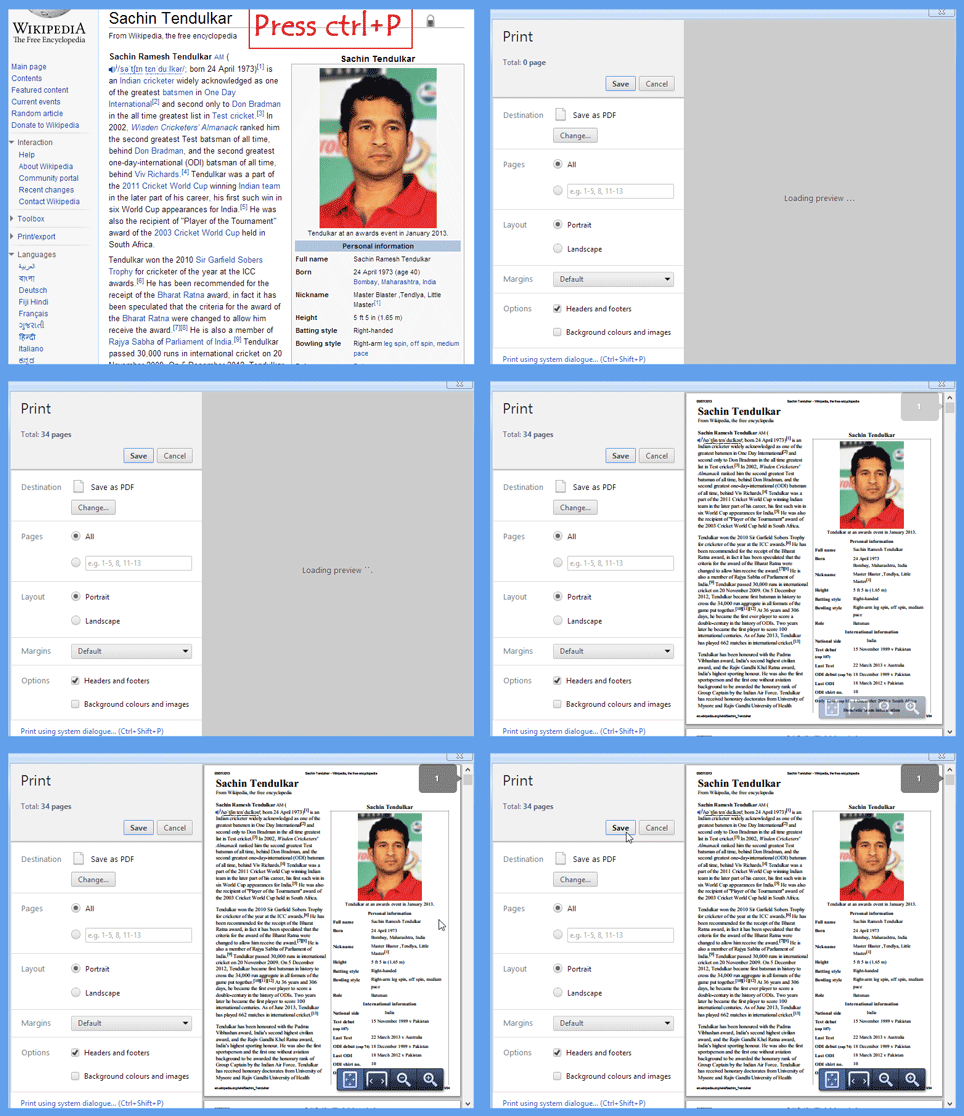
Website to PDF conversion
While browsing a website, if you find something important and want to convert it to PDF, follow the following steps
1) Press Ctrl+P
2) Then you will have your savable PDF document then click on Save
3) If you dont get any Save option then click on Print and then you will have your options
If you get any problem see the above GIF image to have an idea.
Now you can capture any webpages to your PC. As I sated above the importance of browsing websites, one may sometimes interested in saving a particular page of a website to read it later on. In that case it will be worth.

Sunday, September 7, 2014
Samsung Galaxy Note 10 1 2014 Edition User Guide manual
Samsung Galaxy Note 10.1 2014 Edition User Guide manual Pdf - In addition to releasing the Galaxy Note 3 and Galaxy smart watches Gear, Samsung also announced wqzxc the Galaxy Note 10.1 "2014 Edition" which is an upgrade from previous versions.
 |
| Google Images |
The tablet will come in version 800 Snapdragon 2.3 GHz or 5 Octa Exynos 5420 (8-core), depending on the regional circulation. This new tablet Galaxy Note uses Super Clear LCD display wqzxc with a maximum resolution of 10-inch 2560x1600, 3GB of RAM and the tablet version will be released in 16GB, 32GB and 64GB (plus a microSD card slot).
Samsung will release Galaxy Note 10.1 Version 2014 Edition directly with Android 4.3, and equip it with a number of new features such as Screen Write, S Finder, Action Memo and Scrapbook. wqzxc It remains unclear how the tag price pegged Samsung for this tablet. Clearly, Samsung will begin releasing it to the market in the 3rd quarter of this year.
Specifications of Samsung Galaxy Note 10.1 (2014 Edition)
-Size: 243.1 x 171.4 x 7.9mm
-Weight: 535g
-10.1-inch Super clear LCD WQXGA (2560 x 1600 resolution)
-2.3GHz quad-core Snapdragon processor 800 (LTE version) / octa-core 1.9GHz Exynos processor Octa 5 (3G/Wi-Fi version)
-3GB of RAM
-16/32/64GB Of storage
-microSD support up to 64GB
-8 Megapixel camera with BSI sensor, and LED flash
-2 Megapixel camera with BSI sensor
Wi-Fi-ac / a / b / g / n (2.4GHz & 5GHz), Wi-Fi Direct
-Bluetooth 4.0
-USB 2.0
-GPS, GLONASS
-S Pen
-8220mAh battery
-Android 4.3 Jelly Bean with Samsungs TouchWiz on top and features
Friday, August 29, 2014
Free Download Avanquest Expert PDF Pro 7
Free Download Avanquest Expert PDF Pro 7 - AVANQUEST Expert PDF 7 Pro is a premium software that you can use to create PDF documents, PDF files can be created from any application such as Word, Excel, PowerPoint, and even web pages. This application has the uncanny ability to affairs PDF. Avanquest Expert PDF Pro 7 can merge PDF files into one PDF take content from file and saved in Word text.

This software is a tool and the premium paid, but this time you can download them for free from their promo page here. This page in German maybe youll need Google translate. Fill in the requested data.
Open the email listed earlier see email inbox there will be a brisi link to get a free license of Avanquest Expert PDF Pro 7. Just click to get it useless.
Subscribe to:
Posts (Atom)
