Sunday, November 23, 2014
Intel back to school with Tablets running on Android and Windows 8 1
This tablet runs on the processor model of the " Bay Trail "and is not to slide" Celeron N2806 "fast dual-core 1.6 GHz and provider working on touch screen along with a webcam.
Besides the former Computer unveiled " Intel "from another computer running the same size on the system" Android 4.2 Jelly Bean "and the entire body of provider rubber for easy caught him by the student and small, as well as by small.
This works on a computer is a dual processor cores slide " Atom Z2520 "fast 1.2 GHz technology accelerator with" Hyper-Threading "technology as well as three-dimensional graphics acceleration" 3D "which supports 1080p resolution video as a camera background and supports third-generation networks" 3G "and its battery enables it to work up to 1, 2 Hours.
Spain mentioned and what they are oriented to aspects of the educational tools they contain large, as well as sensitive to temperature and will launch as of next month.

Samsung enters Top 10 of global brands thanks to Galaxy S III and Galaxy Note

Samsung have become the worlds largest maker of mobile phones. Interbrand considers the fact as a key reason for this. However, the consultancy also counts the amount of buzz that the Korean company has been able to generate regarding its flagship devices, the Galaxy S III and the Galaxy Note, as instrumental in making Samsung break into the Top 10.

Other brands featured in the report and which have something to do with mobile stuff include Google at No.4, Microsoft at No.5 (down from No.3 last year), Nokia at No.19 (compared to No.14 in 2011), Amazon at No.20, and Sony at No.40.
But I think that will soon change, as Nokia will release its flagship smartphone- Lumia 920 and Lumia 820 come with windows phone 8. The competition between Smartphone and Tablets will become more intense. Today, like Amazon and Google, Microsoft pay a lot of attention in the smartphone and tablets market.
The full Interbrand report is available here.
Related article:
Friday, November 21, 2014
The particular Scooba Wetmopping Robot Helps guide you Gross You happen to be
iRobot’s most current offering may be the Cadillac connected with floor-mopping programs. It’s large, it’s loaded with special features, and on $600, you can’t definitely call it anything but a extravagance item. But the above photograph is evidence which it gets the task done. “The proof, ” because company loves to put that, “is in the tank. ”.
1. Sweep along with pre-soak: Initial, the Scooba vacuums up dried dirt along with small dirt (Cheerios, et al) along with soaks the floor with somewhat water for second step.
2. Scrub along with squeegee-vacuum: This really is where the important action comes about. The comb spins at 600 RPM to really get caked-in grime, while the particular squeegee will start sucking up some of that soiled water.
3. Squeegee complete: For excellent measure — and prone to help iRobot stay away from frivolous lawsuits — Scooba covers the floorboards one final time for you to dry points completely.
On its first go around my muddy Ny city apartment, the robotic had a little trouble. It’s a fair bit larger and never quite as nimble as its older sibling, this Roomba, and it beached by itself on several door jambs. And also since water and power don’t genuinely play jointly nicely, it’s certainly not programmed to come back to its docking place. The robotic finished the project by covering beneath my personal couch, using the floor nonetheless freshly rainy.
Within the upside, this robot’s a talkative 1. If it incurs any issues as you go along, it’ll inform you about in the sort of chipper, passive-aggressive manner befitting of a housekeeping automaton. “I’d adore to start washing, ” that explains when you initially fire that up, “but my personal battery isn’t rather full. ” Stopper it set for a very good three or so hours, and it’ll hop for it.
Trial two: The Kitchening journeyed more effortlessly. Scooba begins by washing in groups, but after that it transitions in to something much more chaotic, traversing the bedroom in apparently random styles that iRobot will assure that you are all part of some complex algorithms — though you wouldn’t know it with the way the ’bot bumps into partitions like it’s drunkenly fumbling after dark.
As with the Roomba, it’s important to note that Scooba is a maintenance device. In other words, don’t go throwing out your mop just yet. You may still need it for heavy jobs.
When you’re searching for something to help out, nonetheless, Scooba can be your ’bot. It’s the most beneficial Scooba nevertheless, even in the event that $600 is really a big capsule to digest — specially when you additional the $80 for the optional drying/charging dock and also the $12 regarding additional iRobot-branded clean-up solution (which I’m not necessarily entirely convinced isn’t only regular soap).
One particular thing’s for sure, though: Vacation around your home with the 450 is a lot like peering to the deepest, darkest areas of your internal. You won’t like everything you find.
Thursday, November 20, 2014
Worst Company EA tipped to third consecutive gong
The Consumerist has admitted that EA seems like a strong contender to claim a unprecedented finally consecutive Most detrimental Company in the usa gong.
“We haven’t also begun to obtain nominations from readers for that next Most detrimental Company In the united states tournament, but some are already making the situation for yet again giving your Golden Poop trophy to reigning two-time WCIA winner Electronic Disciplines, ” it wrote.
“While EA’s growth recently has also been positive, the way the company goodies its consumer base might be dooming the gaming publisher to a new season your WCIA finals.
“The company’s choice to dismiss those Glowing Poos as well as continue publishing shoddy product should be a wake-up call up to buyers, who should vote because of their wallets and choose to not obtain EA game titles until the company learns to respect their customer basic. ”
Citing a piece of writing published somewhere else, it subsequently references not only the well-known SimCity fiasco but also the technical conditions continue to trouble DICE’s present shooter Battlefield four, which was published from the outset of Late.
Within Late recently EA Broadcasters EVP Tanker Soderlund told MCV which he not merely isnt going to think EA would be the toughest corporation in the united states, they also hopes which on time the actual founder can easily opposite it is open public conception.
In another place, EA’s former ALL OF US PUBLIC REALTIONS boss Rob Dark brown possesses told VentureBeat which: “I used age 14 several years on EA. The only establishment Weve previously carried out more time is my personal marital life. As i started out, My partner and i considered it might be some sort of 12-month gig. I had created no objective involving remaining which very long.
“People are likely to neglect EA is often a corporation brimming with men and women. They are happy with just what they designed. Whenever someone attacks this, they react. EA is misunderstood lots. It’s a company brimming with people who are genuinely enthusiastic about games. ”
MCV possesses asserted before which the extremely perception of some sort of games founder becoming referred to as seeing that America’s toughest corporation is preposterous. Of which stance possesses certainly not transformed.
Some cool Tips You have to know Before You Get started with the New iPhone 6

Apples iPhone 6 features a large screen of "4. 7-inches". The iPhone 6 Plus got 5. 5-inch screen with awesome colors. Both feel enormous in comparison to the tiny 4 inch screen for the iPhone 5S.
You guys aint gonna believe me, right? Here is you can see iPhone 5S in the top of the iPhone 6 Plus. The entire body of the iPhone 5S fits within just the screen of the iPhone 6 Plus.

What To Do If You Drop Your iPhone In Water
 s
If you ever happen to accidentally drop your iPhone in water then you will find the do-it-yourself procedure posted by iFixYouri useful, especially since warranties don’t cover water damage.
According to iFixYouri, a repair shop for iPhones, water damaged iPhone is one of the most common iPhone repair types.
Here is iFixYouri’s do-it-yourself (DIY) procedure:
It is imperative to remove the iPhone out of the water ASAP. Once the iPhone is out of the water, you want to make sure it is powered off.
If you get a white pinwheel on the screen and it won’t turn of, you hold down the power button and home button until it turns off. In the video we failed to record it powering back on after we powered it off. Wesimply repeated the ‘power off process’ and moved on to the next important step; remove the SIM card.
Once the SIM card is removed you want to put the iPhone in an uncooked bag of rice. Tighten the bag so all extra air is gone and seal it.
Wait 48 to 76 hours after the water exposure and then try it out. If you find at that time it is not functioning properly as a result of the iPhone water damage put back in the rice and mail it to iFixYouri who specialize in fixing water damaged iPhones.
Monday, November 17, 2014
Review Samsung efforts to fight with Apple

Samsung officially released its second generation of the Galaxy Note-Samsung Galaxy Note II on August 30, 2012. And rumors said Samsung is planning to launch a service called S Cloud, which would (obviously) compete with Apple’s iCloud.


Tuesday, November 11, 2014
LG G Pro 2 expanding markets to Asia

The South Koreans electronics manufacturers recently announced phablet, LG G Pro 2 is expanding it sales towards the Asian region too. Today, the company released a Press note, where it mentioned that their new handset and native exclusive will be coming to some Asian countries, starting from Hong Kong, Taiwan, Singapore, Philippine, Vietnam to Indonesia, along with others joining in the coming weeks.
The device was announced back in last month, days before the Mobile World Congress trade show kicked off. As a reminder, the new LG made G Pro packs a Quad-Core Qualcomm Snapdragon 800 processor clocked at 2.26GHz, 5.9-inches Full HD IPS screen of 1920 x 1080 resolution display, 32 gigabytes of internal mass storage (expandable via microSD card slot), three gigabytes of DDR3 RAM, 13 megapixels main camera on the back with Optical Image Stabilization Plus (OIS+) technology and Natural LED flash light, capable of capturing videos at slow motion and in 4K Ultra HD, marked at 3840 x 2160 resolution and in 1080 pixels at 120 frames-per-second, 2.1 megapixels front facing camera, Bluetooth 4.0, Near Field Communication (NFC) and 4G LTE-Advanced connectivity support, 3,200mAh powered battery and Androids version 4.4 KitKat with LGs Emotional UX and other known features like Knock Code and high power 1 watt HI-Fi speaker stuffed in. Pricing details are unknown at the moment.
"With its 5.9-inch Full HD IPS display, versatile camera functions and user-oriented UX features, we expect the LG G Pro 2 to make a strong impression with Asian customers. Asian consumers have been the biggest fans of smartphones with displays over five inches and we wanted to make sure that the G Pro 2 exceeded their high expectations," said Dr. Jong-seok Park, President and CEO of LG Electronics Mobile Communications Company.
Source: LG
Monday, November 10, 2014
Using iTunes to Manage Music on Android
On of the biggest complaints heard from Android users is that there is no way to manage their music as simply as they can with an iPhone and iTunes. Unfortunately, Android does not currently have a desktop music service (expect a cloud-based option in the near future from Google) besides the computers file browser. There are several programs that offer to be an "iTunes replacement" for Android, however, some users just love iTunes and want to continue using it. This article will show you how to use iTunes to manage the music on your Android device. However, there are some things you will need to be aware of:
- You will still need to occasionally use Windows Explorer or your computers file browser to view the files on your device
- You will not be able to purchase songs in iTunes and expect them to play on Android
- This is a work-around and requires a bit more work that the seamless iTunes to iPod syncing
- You cannot have other songs in iTunes that you dont have on your Android device already
- You will only be able to access the songs in iTunes when your phone is plugged in
- This method takes a bit more work and remembering to copy new files when you purchase them
I will explain the reasons for these restrictions as we go along. So lets begin.
Organizing With Folders in Windows
Before we can begin with iTunes, you must first organize all of your music using Windows Explorer (or your file manager on Mac). Open the folders that you store music in and look around. You are going to have one main folder called "Music." In that, you will have the following sub-folders: "Music for Android" and "Other Music." In the "Music for Android" folder, you will be putting all of the songs you want to have on your Android phone. In the other folder, you will put all of the songs that are in your collection but that you dont want on your phone. You can cut and paste songs between the two folders freely.
Connecting Your Phone
Once you establish which music files you want on your phone, you are going to copy them onto your phone. To do this, plug your phone into the computer with the USB cable and select "Mount as USB storage" on your phone. You will now notice that your phone has become a removable storage device. Open it up in your file manager and locate the folder called "music." If one doesnt exist, you can create it. (Note: this guide is written as if you dont already have music on your phone. If you do, you can copy it all to the "Music for Android" folder on your computer.) Into this folder you are going to paste all the music from the "Music for Android" folder on your computer. It sounds complicated, but its not that bad.

Once all of your music is copied to your phone, you will now have two copies of the music: one stored on your computer, the other on your phone. When you download a new song from Amazon or online, you will need to save it to your phone AND the folder on your computer. Essentially, you want to make sure they remain exact copies of one another.
Setting up iTunes
Now that you have music on your phone, you are going to tell iTunes that you want it to manage your library of music on your phone as if it were your desktop. If you already have music in iTunes, you will need to remove it from your library for this to work (I warned you in the intro). This doesnt delete the music from your computer, rather it simply gives iTunes a fresh start.
Now, make sure your phone is connected and mounted as removable storage. In iTunes, click "File" > "Add File to Library..."

In the window that appears, locate your phones music folder that you copied the music into earlier. Select all of the files by clicking the first one, holding Shift, and clicking the last one. Then, click "Open."


Once your music finishes importing, iTunes will display all of the music on your device. Your iTunes Library will only be accessibly when your phone is plugged in and mounted because iTunes is reading the files from your device. Whenever you edit a file in iTunes, the changes will be reflected on your device because it is treating them as raw mp3 (or other) music files. There is, however, one exception: album artwork.
Album Artwork, iTunes, and Android
For whatever reason, iTunes doesnt like to handle album art work very well. It will download album art work and reflect it within iTunes, but if you unplug your phone and open the Music app, you will not see that artwork. If art work is a big issue for you, you may not want to use this solution because it is time consuming. However, it is simple, assuming you remember to do it each time you download a file (Note: if you download music from Amazon or another online music store, the album art work is usually encoded in the file and it isnt necessary to encode it using iTunes.) To add album art work, right click on a music file in iTunes and select "Get Album Artwork." Then, right click on it again, and choose "Get Info." Click on the "Artwork" tab.

Now here is the tricky / weird part. When iTunes downloads album art work, it doesnt store that art work in the file like Amazon does when it sells a song to you. Instead, it is only accessible when you are viewing the song in iTunes. In order to actually make the album art work encoded within the file and viewable on Android and other music players (like Windows Media Player), you must paste the file into the Artwork tab. This can be done by right clicking on the Album art that iTunes finds and selecting "Cut" and then right click in the blank space and choose "Paste."

Although it doesnt look any different now, the art work is now encoded into the file. You will need to repeat this for every song. Time consuming? Yes. But its the price to pay if you want accurate album art using iTunes on Android.
Things to Remember
The good news is that you have completed all the difficult steps. The only thing to do now is to remember a few things:
- When you download a music file on your computer that you want on your Android phone, save one copy in "Music for Android" and then copy another copy onto your phone when it is mounted.
- When you download a music file on your phone from an app like Amazons music market, remember to copy and paste it into your computers "Music for Android" folder
- If you change a file on your phone using iTunes, copy it into your "Music for Android" folder and remember to OVERWRITE the old file with the new.
- You cant make changes to your iTunes library unless your phone is plugged in and mounted
- Dont download music from iTunes. You must use Amazon or some other DRM-free service.
Samsung Galaxy Alpha smartphone to make its debut on August 4

Samsungs new premium smartphone in from the latest leaks and rumors is the anticipated Galaxy Alpha handset. The phone has already made a good number of peeps from the wild and lately, we also saw SAMMOBILE providing a better look at the smartphone and its hardware along with other details. Today the people from the same source are here, telling us that the impending smartphone from the South Korean multinational electronics manufacturer will be making its first public debut and the company will officially announce it in just a weeks time.
Well, if you are new to the phone, the looming Samsung made Galaxy Alpha is a high-end middle ranged smartphone, which is speculated to be the companys first ever smartphone partially made out of some solid metal (reportedly aluminium), running Android operating system on board, seizing it lower than the Galaxy S5 Mini range, as reported in the past. Galaxy Alpha will allegedly having its chassis made from metal and from the back well be getting the perforated fake leather textured plastic for the battery door, that is identical to the firms new bellwether smartphone, Galaxy S5. Lastly from the front, we are seeing a sheet of glass, possibly the latest generation Corning Gorilla Glass for protection of the display.
And now according to this latest read, the sources confirm that the new yet to go official smartphone from Samsung will be announced in next month, on the 4th of August, as rumored earlier. As we read on, the electronics maker from Korea needs the excitement for the Galaxy Alpha smartphone to die before they go ahead and announce the next generation Galaxy Note smartphone, somewhere in September. In term of the leaked internals, the Samsung Galaxy Alpha totes a 4.7-inches High Definition Super AMOLED screen of 1280 x 720 resolution pixels, 32 gigabytes of internal mass storage with no further expandability, nano-SIM card slot, fingerprint scanner integrated to the devices home button and heart rate sensor on the back, like the flagship GS5.
Source: SAMMOBILE
Sunday, November 9, 2014
Oppo Find 7 to come in two versions

Earlier we have received the report about the Oppo Find 7 camera and today what has turned up is that the Oppo Find 7 is officially said to come in two versions. First version will have the Qualcomm Snapdragon 800 chipset, the screen resolution of 1920 x 1080p display and two gigabytes of Random Access Memory.
Second version will have the latest Qualcomm Snapdragon 801 chipset, 2K display with the resolution of 2560 x 1440 and three gigabytes of Random Access Memory. These devices will launch on 19th March 2014 in Beijing.
Source: Gizchina
Saturday, November 8, 2014
Adding a Logo or Watermark to Videos
i am using the software is have so many fetchers looking other.
It have so many fetcher to create video water marking.you cam load your own logo and make text on videos that help you put link about your site and get more popular your site .
The software name is "video water marker pro"
The following video is explain you working of video water mark pro
water mark on videos, i am using for water mark my videos water marker pro, you can download from online now.
Friday, November 7, 2014
How to Backup and Restore Application Sony Xperia Z1 Compact
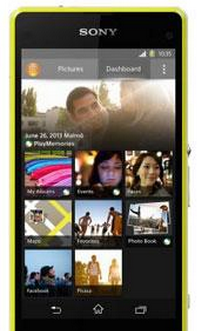 The Backup and restore application is recommended for backing up content before you do a factory data reset. With this application you can back up the following types of data to an SD card or to an external USB storage device that you have connected by cable to your device:
• Bookmarks
• Call logs
• Contacts
• Applications downloaded from Google Play™
• Multimedia messages
• System settings (such as alarms, ringer volume, and language settings)
• Text messagesTo back up content using the Backup and restore application
1. If you are backing up content to a USB storage device, make sure the storage device is connected to your device using the appropriate cable. If you are backing up to an SD card, make sure the SD card is properly inserted in your device.
2. From your Home Lcd, tap Apps icon or 9 dotted icon.
3. Find and tap Back up & restore.
4. Tap Back up, then select a backup destination and the data types that you want to back up.
5. Tap Back up now.
6. Enter a password for the backup, then tap OK.To restore content using the Backup and restore application1. If you are backing up content to a USB storage device, make sure the storage device is connected to your device using the appropriate cable. If you are backing up to an SD card, make sure the SD card is properly inserted in your device.
2. From your Home Lcd, tap Apps icon.
3. Find and tap Back up & restore.
4. Tap Restore.
5. Select the record that you want to restore from, then tap Restore now.
6. Enter the password for the backup record, then tap OK.
Warning: Remember that any changes you make to your data and settings after you create a backup will
get deleted during a restore procedure.
Thursday, November 6, 2014
Sundar Pichai to bring next version of Android OS at Google I O

Google I/O or the companys Annual Developers Conference is at our doorstep, on 25th and 26th of June, where about 6,000 developers and media officials will be flooding their way to San Francisco, California, United States.
The main man on the shows floor is Sundar Pichai, Senior Vice President of Android, Chrome and Apps, at Google. After an interview with this Google Senior VP, the people at BloombergBusinessweek, believes that, Androids head, Pichai and Google are all set to introduce their next version of Android operating system, which is ready to be showed in public attendance at their impending Annual Developers Conference, in just a days time.
We really dont know who to take this news at the moment, as Google has always kept a habit of announcing the latest editions of their mobile operating system, often in fall, somewhere in October or November, as seen from the previous years. The source reports, exactly claims that, Sundar Pichai has started preparing for Google I/O, earlier this month, where Google actually plans these events at the last minute. In this regard, Pichai had to make different decisions on the companys projects those are ready to be showed off to the community. And they also writes that, he will be previewing the next release of Android operating system, that is rumored to be named as Lollipop or Lemonhead, at the Google I/O event, rather than keeping it cook until this years fall. As this statement seems to be hinting, "I want the world to understand what we are doing sooner."
"Device makers complained this was too late to prepare for the holidays and put them at a disadvantage to the one company selected each year to develop the Nexus phone in conjunction with Google."
Other than just about Android itself, Sundar Pichai is expected to talk some words about their new Android Wear, a wearable system software based on Android, alongside he will also be announcing new manufacturing partners, that will build products using Android Wear platform.
Source: BloombergBusinessweek, Android Central
Tuesday, November 4, 2014
Motorola is inviting the Press to London on May 13

Motorola have sent out its invites to their Press Conference, that is about to take place in London, United Kingdom in couple of weeks time. So if your anticipated to know whats next from the American telecommunications equipment provider, Motorola Mobility, then make the date, 13th of May, 8:45 AM local time on your calenders, as the company already hints about the introduction of their next smartphone.
"Connect more people to the worlds information and each other, and they can do great things. Introducing the next smartphone from Motorola to make these connections happen. Made to last. Priced for all," quoted Motorola in their invitation slip.
Talking about the words like "made to last" and "priced for all", tips us seeing a smartphone that is much more durable to use and also goes well with the affordable pricing mechanism. Picking whats already there there in our past leaks and rumors tags are the Motorola made Moto E, which is expected to come out of the box with a Dual-Core processor, clocked at 1.2GHz, 4.3-inches HD screen of 720p resolution, four gigs of on board expandable storage, one gigabyte of RAM, five megapixels main shooter, a 1,900mAh battery and running Android 4.4 KitKat on top. Then we have the Moto X successor, Moto X+1, which dont seems to fit well with words what Motorola is describing all at the moment. Even though its all going to be about the firms next smartphone as aforementioned, but we also hope to see some news come out based on their new wearable, the Moto 360s consumer launch.
Tuesday, October 28, 2014
How to convert a webpage into a PDF document
of these carries any meaning without other. Websites are used as references in many purposes, as for example if we dont know the meaning of a word you can search it instantly which will be available in a particular website. Similarly one can find his/her best diet routine, you can read e-newspaper, shop online, can book your travel tickets etc.
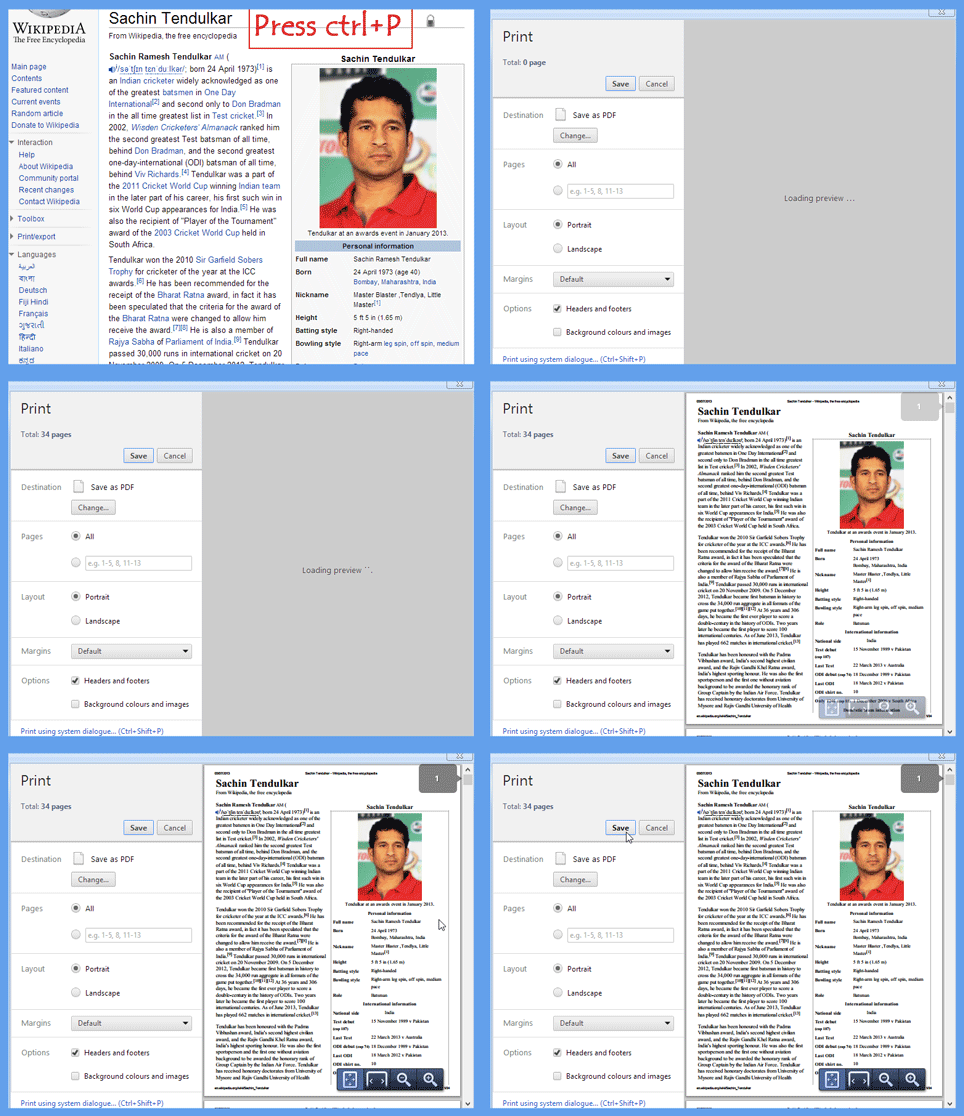
Website to PDF conversion
While browsing a website, if you find something important and want to convert it to PDF, follow the following steps
1) Press Ctrl+P
2) Then you will have your savable PDF document then click on Save
3) If you dont get any Save option then click on Print and then you will have your options
If you get any problem see the above GIF image to have an idea.
Now you can capture any webpages to your PC. As I sated above the importance of browsing websites, one may sometimes interested in saving a particular page of a website to read it later on. In that case it will be worth.
Sunday, October 26, 2014
How to style blog post headings
.post h3{
color:#0174DF;
border-bottom:1px dotted #1C1C1C;
font-size: 14pt;
padding:3px;
}
.post h3{
color:#0174DF;
border-top:1px dashed #1C1C1C;
border-bottom:1px dashed #1C1C1C;
font-size: 14pt;
padding:3px;
}
.post h3{
color:#0174DF;
border:2px solid #1C1C1C;
font-size: 14pt;
padding:3px;
}
.post h3{
color:#0174DF;
border-top:2px dashed #1C1C1C;
border-bottom:2px dashed #1C1C1C;
font-size: 14pt;
}
.post h4:hover{
border-top:2px solid #0080ff;
border-bottom:2px solid #0080ff;
background-color: #289728;
color:#fff;
}
.post h3 {
border-bottom: 2px solid #289728;
color:#0080ff;
font-size:14pt;
}
.post h3 span {
position: relative;
left: -0.3em;
bottom: -0.6em;
padding: 1px 0.5em;
margin: 0;
border: 2px solid#289728;
background-color: #fff;
}
.post h3 {
background: #ffffff url(URL OF Side Image) top left repeat-y;
font-size: 14pt;
color: #0090ff;
padding:28px 0 0 44px ;
}
.post h3:hover {
color: #289728;
}
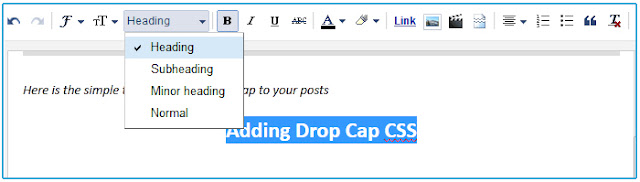
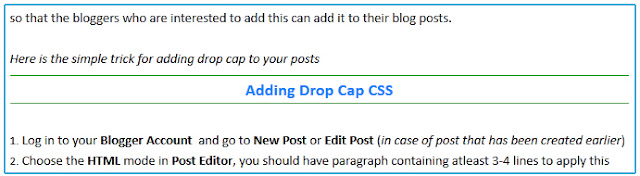
Implementation
Monday, October 13, 2014
How to Send a Multimedia Message and Create a Slideshow on HTC Desire 816
 Text messaging has grown its popularity over the years especially to younger generations. People, especially teens, prefer to communicate with friends and relatives thru texting instead of the traditional call. But whether your reaching out to friends thru text or a call, what matters most is the effort for still trying to keep in touch despite distance and even on busy schedules. We should be more grateful these days as it only takes minutes, even seconds, for a quick response unlike the old school snail mail. Now, everyone is just a text away. And more to that, you can even send multimedia messages (MMS) especially on special occasions to add more touch to a simple text-filled Lcd.
Heres how you can send a MMS on HTC Desire 816:
1. On your devices homeLcd, tap on
 and go to Messages.
2. Then tap on

3. On the To Field, key in a contact name, mobile number or email address. You can also send it to a group of friends by tapping on

4. To add a subject line, tap on
 and go to Add Subject.
5. Tap on the box that says Add text and there you can type in your special message.
6. Choose an attachment for your message by tapping on

7. After you browse and select an attachment, tap on Send or press
 to save it as a draft. You can also tap on
 to see options like replacing, viewing and removing your attachment.
Now if you wish your Mutimedia Message to reach an extra mile, you can have it on a slideshow format. Heres how you can create one:
once again and select Slide.2. Then choose where you want to insert the next slide.
3. When youre done adding the next slide, you can either do the following:
- tap onand choose to add a video or a photo
- tap onand then audio if you want to add a voice recording or a music to the slide
- tap on Add Text to add a caption
- tap onto view options like replacing, viewing or removing your attachment.
select Preview. If you dont see Preview, scroll down the menu. To view the playback controls, tap once the preview Lcd. or tap on Send to save message as a draft.