Showing posts with label 2. Show all posts
Showing posts with label 2. Show all posts
Friday, November 21, 2014
Which would you choose Samsung Galaxy Note 2 or the Google Nexus 4
Samsung Galaxy Note 2, the smartphone-tablet hybrid from Samsung Group, which was launched in September, is said reached the impressive 5 million sales in 2 months, The Korean technology giant said in a statement (Google Translate) on November 26. Although the Note 2s sales are far behind that sells of the Galaxy S3, which Samsung sold 20 million of its flagship smartphone in the first 100 days after its launch, but it indicate that the high-end smartphone with top-of-the-line features is in great demand. Can it outsell the LG Nexus 4 which offers better operating system, price tag and often sold out in a short time?![Samsung]()
Today, we take a look at the Nexus 4 versus the Samsung Galaxy Note 2 in terms of features, price and more to help you decide which one to buy.
Read More..

Addition: One of the unique features of the Samsung Galaxy Note 2 is the device’s S-Pen, a stylus that benefits from some unique software that Samsung has included on the Galaxy Note 2. With the new S-Pen, Some of those applications include Air View which allows users to hover over things like e-mail, calendar or an image to get a preview of the content before actually having to open it, a feature called Easy Clip which lets users crop content on Lcd including images to save for later use, and finally, the ability to use the S-Pen to draw out Quick Commands for tasks like email. So you will feel so convenient to use the phone even it has a large Lcd.
So which phone do you like more?
So which phone do you like more?

Wednesday, November 19, 2014
Micromax announces the Micromax Unite 2

Micromax releases out a new smartphone named Micromax Unite 2 A106. The budget friendly smartphone comes in wide range of colors like White, Grey, Green and Red. It supports 21 pre-loaded Indian regional languages.
Regarding the specifications, the Micromax Unite 2 packs a MediaTek MT-6582 Quad-Core chipset speeding at 1.3GHz processor and Mali 400 GPU, 4.7-inches IPS screen with the resolution of 480 x 800 display, four gigs of internal memory (expandable up to 32GB via microSD card slot), one gigabyte of Random Access Memory, five megapixels auto-focus snapper with LED flash and two megapixels front-facing camera, 2,000mAh powered battery and runs the latest Android version out of the box version 4.4.2 KitKat.
For connectivity options it supports Bluetooth 4.0, WiFi, GPS, 3G, microUSB port. It has dual-SIM capability too. No information about the availability of the handset. The pricing of the device is USD 120.

Source: Micromax
Friday, November 14, 2014
New render surfaces of Samsung Gear 2

New much clearer alleged Press render leaks of the upcoming Samsungs wearable, named Gear 2, from the source of wanted leakster, evleaks, Twitter. Why isnt this specific South Korean device dubbed with the Galaxy mark? Well, its probably because of a recent tweet from the courtesy, quoting, "I misspoke. Those watches are not Galaxy-Branded."
Earlier we heard that the new Samsung made smartwatches are rumored to come in two new models, named Galaxy Gear 2 and Galaxy Gear 2 Neo. But after this correction from the tipster, we seriously doubt what the company has got down in their pipeline. Also the previous pictures posted yesterday, showed us two physically different watches, while only one of them is been faced-off above. Nevertheless, we have already seen the first generation Samsung Galaxy Gear coming out of its box with a 1.9 megapixels camera on board, from this new units design too, we again witness couple of slots above and below the screen, respectively, suggesting the upper portion to compensate the shooter and lower one to be a hardware home button, if we are not wrong.
As far its announcements are concerned, we see the dates of 24th of this month, Monday on the screen of the Samsung Gear 2 pictured here, which again leads us all the way to the companys upcoming Unpacked 5 Press event for this years Mobile World Congress trade show, where we expect the Samsungs Galaxy S5 flagship also to turn up.
Source: evleaks (Twitter) 1, 2
Tuesday, November 11, 2014
XEL 2 will fall
 Prior to the IFA 09 exhibition for nearly five months, but the newspaper The Korea Times has claims that Sony is supposedly going to submit its second OLED TV, XEL-2, it was there, in Berlin this fall. In this case the source of the Korean referred to some informed sources in Japan and South Korea.
First of all, we recall that XEL-2 is the code name of this model, as long as no one knows which index Sony is going to give it. Incidentally, the first and still the worlds only commercial OLED TV, the index has been assigned the XEL-1. Currently, little is known about the XEL-2, or even none (except for Sony, of course!) Can not yet say exactly what size screen on this model. Recall that a year ago, Sony showed a prototype 27-inch, and the exhibition FPD 09, held last week in Japan, a famous Japanese company has demonstrated a 21-inch model, which, incidentally, has a very slim - only 1 cm
How reliable data provided by The Korea Times, it is difficult to say, but apparently, Sony has recently made great strides in the field of OLED technology, and the Japanese company is not shy to show their latest achievements.
Source: OLED-Info
LG G Pro 2 expanding markets to Asia

The South Koreans electronics manufacturers recently announced phablet, LG G Pro 2 is expanding it sales towards the Asian region too. Today, the company released a Press note, where it mentioned that their new handset and native exclusive will be coming to some Asian countries, starting from Hong Kong, Taiwan, Singapore, Philippine, Vietnam to Indonesia, along with others joining in the coming weeks.
The device was announced back in last month, days before the Mobile World Congress trade show kicked off. As a reminder, the new LG made G Pro packs a Quad-Core Qualcomm Snapdragon 800 processor clocked at 2.26GHz, 5.9-inches Full HD IPS screen of 1920 x 1080 resolution display, 32 gigabytes of internal mass storage (expandable via microSD card slot), three gigabytes of DDR3 RAM, 13 megapixels main camera on the back with Optical Image Stabilization Plus (OIS+) technology and Natural LED flash light, capable of capturing videos at slow motion and in 4K Ultra HD, marked at 3840 x 2160 resolution and in 1080 pixels at 120 frames-per-second, 2.1 megapixels front facing camera, Bluetooth 4.0, Near Field Communication (NFC) and 4G LTE-Advanced connectivity support, 3,200mAh powered battery and Androids version 4.4 KitKat with LGs Emotional UX and other known features like Knock Code and high power 1 watt HI-Fi speaker stuffed in. Pricing details are unknown at the moment.
"With its 5.9-inch Full HD IPS display, versatile camera functions and user-oriented UX features, we expect the LG G Pro 2 to make a strong impression with Asian customers. Asian consumers have been the biggest fans of smartphones with displays over five inches and we wanted to make sure that the G Pro 2 exceeded their high expectations," said Dr. Jong-seok Park, President and CEO of LG Electronics Mobile Communications Company.
Source: LG
Saturday, November 8, 2014
HTC One Mini 2 gets officially announced

HTC has announced their miniature version of their latest flagship HTC One Mini 2. The phone will continue to sport the firms traditional BoomSound dual-stereo speakers placed towards the front of the device, alongside BlinkFeed and Zoe. The specifications details are as follows.
The One Mini 2 should be to coming up with a Qualcomm Snapdragon 400 chipset speeding at 1.2GHz processor and Adreno 305 Graphical Processing Unit, 4.5-inches Super LCD2 screen with the resolution of 1280 x 720 display marked at 326ppi, 16 gigs of internal memory (expandable via microSD card slot), one gigabyte of Random Access Memory, 13 megapixels rear camera with BSI sensor, LED flash light and f/2.2 aperture, 5 megapixels front-facing camera, 2,100mAh powered battery and runs Android version 4.4.2 KitKat and companys User Interface on the top.
The dimensions of the handset are 137.4 x 65 x 10.6 millimeters thick and weighs 137 grams. For connectivity options it supports Bluetooth 4.0, dual-band WiFi, Near Field Communication, microUSB 2.0. The device offers 16 hours talk time (3G). One Mini 2 will be available in Glacial Silver, Gunmetal Grey and Amber Gold. There in no information about availability and pricing of the device.

Source: GSMArena
Thanks to Syamanth for sending this in...
Thursday, November 6, 2014
HTC One Mini 2 2014 leaks online

HTCs upcoming smartphone or One 2014s (M8) miniature version has made its first round on the internet, with the trustworthy watermark of evleaks from Twitter, and will be reportedly named as the HTC One Mini 2 for 2014.
The new phone seems sport the Taiwanese flagship like color pattern, coming in Gunmetal Gray, Glacial Silver and Amber Gold. From its hardware the leaked unannounced smartphone looks almost same like the One M8, resembling identical design from its big brother, coming with the front sided dual-BoomSound speakers and the its predecessor like plastic rim going around the screen, but of course it will feature a smaller display size and less powered middle-ranged internal specifications out of the box. And what we do notice here is the absence of the duo-cameras on the back and the dual-tone LED flash lights.
According to the past reports, the phone is currently rumored to feature a Quad-Core Qualcomm based Snapdragon 400 processor clocked at 1.4GHz, 4.5-inches screen of 720p resolution display, 16 gigabytes of on board storage (expandable via microSD card slot), one gigabyte of RAM, 13 megapixels primary camera on the back with LED flash light, surprisingly we dont hear about an Ultrapixels sensor this time, there is also five megapixels front facing snapper with Bluetooth 4.0 and WiFi a/b/g/n/ac radios, Androids version 4.4.2 KitKat with HTCs own Sense User Interface 6.0 on top.
Source: evleaks (Twitter), Android Central
Thursday, October 30, 2014
Pavtube BDMagic 4 7 2 Adds Galaxy Note 4 Output
The new version of Pavtube BDMagic 4.7.2 is specially designed for converting your beloved BD/DVD videos to iPhone 6, iPhone 6 Plus and Galaxy Note 4 for watching! As the best Blu-ray/DVD Converter, it performs perfectly in copying Blu-ray and DVD with original structure, and convert 2D/3D Blu-rays and standard DVDs to watchable video/audio format for mobile devices.

Version: 4.7.2
Supported OS: Windows 2003/XP/Vista/Windows 7/Windows 8/Windows 8.1
Download the lateast version of Pavtube BDMagic here.
Three new profiles:


Best Profile Settings:


Read More..
Version: 4.7.2
Supported OS: Windows 2003/XP/Vista/Windows 7/Windows 8/Windows 8.1
Download the lateast version of Pavtube BDMagic here.
Three new profiles:
Best Profile Settings:
Monday, September 8, 2014
How To Print With The Apple iPad And iPad 2
Among other things the iPad 2 is a great way to save paper. It lets you carry around digital documents that you might otherwise have had to print. But from time to time you may still need to print data thats on your iPad 2. Business documents that you created in Pages And Numbers, For Example driving directions to hand to someone whos not packing silicon. Print from the iPad 2 can be easy if your needs are modest. But even if theyre more complex, there is as they "An App For That".
(The Following Steps Are For The iPad, including the iPad 2, and for Both Wi-Fi and 3G models.)
The Basics
Even though you can add a USB port to your iPad 2 with Apples iPad Camera Connection Kit, plugging in a USB printer is useless because iOS doesnt know how to talk to printers via USB. Some printers have built in Wi-Fi (A Natural Match For The iPad 2). But for the rest, youll need a computer or other proxy device to serve as a conduit for iPad 2 print Jobs. Your iPad connects wirelessly to your Mac (or Other Devices) and that in turn connects your printer.
But the communication channel is only part of the picture, you also need software that knows how to send data to the printer in the right format. Starting with iOS 4.2 Apple built printing support into the iPad with a Technology called AirPrint. Any app that has been updated to take advantage of Airprint can print wirelessly to a compatible printer. It just takes a couple of taps and gets your documents/information printed.
For Reasons that only Apple knows, the initial implementation of AirPrint works with just a handful of newer HP printers that support something HP calls ePrint. If you happen to have such a printer ( HP Provides a list of them on its website: Go to macworld.com/7182 ) and its on the same local networks as the iPad 2, your iPad 2 will be able to see it and print without any special configuration. Thats not all ePrint can do for you. It also gives your printer a private email address. So if you send a message to that address with a document attached, the attachment will be printed.
Activate AirPrint
If you dont have an HP ePrint compatiable printer, you can still use AirPrint with most printers. All you need is a bit of extra software that runs on your Mac. Collobos Softwares Fingerprint ($8.00 www.collobos.com) or eCamm Networks Printopia ($10.00 macworld.com/7205). Install either one on a Mac on your network, select the printer(s) you want your iOS devices to be able to use and you can then print to those printers from your iPad 2 as of they where HP ePrint printers. Both apps also let you use the Print Command to send documents to Dropbox or to a folder on your Mac in lieu of a printer.
The two applications do have their own differences however. Fingerprint requires OS X 10.6 or later, and has option to "print" directly to iPhoto on your Mac. But before a printer appears in Fingerprint, you must share it by enabling a setting in print and fax system preferences. Printopia supports OS X 10.5 or later, works with any printer (Shared or Not) and can send files from your iPad 2 to a PDF or PNG file on your Mac (Much like OS Xs print to PDF capability). As of version 2.0 it also lets you "print" not only to iPhoto but to any Mac application. It enables you to save files to any number of folders on your Mac and you can launch Any PDF workflow thats on your Mac.
Click the PDF pop-up menu in any OS X print dialog box to see all your options and configure your printer settings. For all of those reasons, I greatly prefer Printopia to Fingerprint. Another option exists, too. And its even free (Although payment is requested). Netputtings AirPrint Activator, but even though AirPrint Activator serves the same basic purpose of enabling AirPrint to use any printer your Mac can connect to, its setup process is rather tedious and it doesnt offer a way to print to Dropbox or to a folder in your Mac computer.
Print With AirPrint
Once you have either an ePrint compatible printer or an AirPrint enabler set up printing from your Apple iPad 2 is simple and easy. First look for a print command in an app. Assuming that the app has been updated for AirPrint Support, the command is in there somewhere although the location varies sometimes it appears when you tap a button with the word Print or a Printer icon on it. and other times it may be in a pop over that appears when you tap a Tools, Send, or Action icon. When you doubt check the Apps Help File.
Next if this is your first time using AirPrint or if you want to switch printers, tap Select Printer and then tap a printer name. The printer you select becomes the new default printer you can skip this step next time if you want to use the printer again. The change the number of copies, tap the plus-sign or minus-sign button. For multipage documents, you can limit which pages print by tapping Range and selecting the start and end page numbers. When youre done tap Print.
Your document will begin printing. While that is in progress you can double tap the home button and then tap the print center icon to view and manage your print jobs. Print Center disappears when printing is done.
Print Without AirPrint
AirPrint is certainly easy to use, but it may not meet all your needs. Some Apps and some printers dont support it. Plus, AirPrint offers no control over things like paper size or print quality and it doesnt work when your slected printer is not on your local network. For these reasons and more, you may want a different sort of printing method. Of the many other third-party printing apps. I personally prefer the following Three: Avatron Softwares Air Sharing HD ($10.00 macworld/6707) is a Multi-talented file transfer app thatcan print directly to any shared printer on your local network (with or without AirPrint). And it gives you access to all your printers standard options.
Microtechs ePrint ($3.00 macworld/6172) like Air Sharing HD can directly access printers on your local network. Amont the many things it lets you print are documents transferred from other iOS apps, web pages, data from the Calendar and Contacts Apps and the contents of the clipboard. One of several iOS printing Apps from Eurosmartz, Print Central for the iPad ($9.00 macworld/7204 communicates directly with Wi-Fi and AirPrint compatible printers, but you can also install a small helper application on your Mac can WePrint that lets PrintCentral work with almost any printer. WePrint even lets your iPad 2 print remotely by using an email account an iDisk or a WebDAV server as a channel for print jobs.
Sunday, September 7, 2014
HTC One Google Edition Android 4 2 2 Stock Rom
HTC One is now one of the most popular high end device of 2013.Its superb features and Hardware specs can compete with any smartphone available in the market now.HTC One is a strong competitor of Samsung Galaxy S4 & Sony Xperia Z.HTC One comes with Android 4.1.2 and now upgradable to 4.2.2.But other good news from HTC is that Google Edition of HTC One is now available.
What is Google Edition of Android???
What is Google Edition of Android???
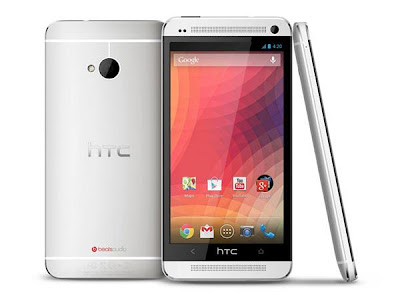
Well many from you know about Googles Nexus series of smartphones & tablets.This devices come with Pure Android OS.They devices gives you pure android experience.No external skins or launchers are come in it.For example Samsung has their Touchwiz or HTC has their HTC Sense.
So know you can get that pure experience of Android OS in your HTC One (m7) or Samsung Galaxy S4...
In this post we will guide you about how to Install Google Edition of Android in your HTC One
1. Before You Begin:
- Make sure your device battery is charged upto 60%.
- Enable USB debugging mode (Menu (app drawer) > Settings > Manage Applications > Development > USB Debugging – check box).
- Install HTC One drivers from
- Download HTC USB Drivers or Download HTC Sync Manager (Contains Drivers).
- Your phone bootloader must be unlocked.
- You phone must be rooted & with custom recovery (You can do it from here).
3. Install Google Edition Stock Rom in HTC One:
- Connect your device with PC & copy downloaded file into Internal storage of your device.
- Power Off your device.
- Now boot in Recovery Mode by pressing VOLUME DOWN+POWER BUTTON and then select "Recovery".(Use Volume keys to move up/down & Power key for select)
- Now select Install zip from SDcard and select the downloaded file (you copy in first step).
- Select YES for start installing of Google Edition.
- The installation process take few minutes to complete.
- Now select Reboot System from the main menu of recovery.
- First boot of device can take upto 10 mins.
- Now your device & you is ready for enjoying the Pure Nexus Experience.
Now enjoy the Google Edition of Android in you HTC One device.....
Friday, September 5, 2014
Pantech Vega No 6 Latest Phablet with Screen 5 9 Full HD and Qualcomm Snapdragon S4 Pro and 2 Gb RAM
It was reported earlier this year that 2013 will present a major phablet that will soon be on the market and phablet will be presented by one of the manufacturers which Pantech their latest product named Pantech Vega # 6 which is a phablet with a fairly large screen support and Full HD.
Phablet Pantech Vega No. 6 features specs include a touch screen with a size that is large enough with a 5.9-inch Full HD 1080p resolution when compared with other phablet that has a screen size of 5 inches Full HD screen which is on phablet Pantech more tough and good. Additionally phablet is powered by Qualcomm Snapdragon processor reliability of S4 Pro with 1.5 GHz speed and supported by the GPU Adreno 320 and 2 Gb of RAM and do not miss a very large internal memory which is 32 Gb.
 |
| Google Images |
The interesting thing is offered from phablet this phablet support microSDXC with capacity up to 2 TB. Surely phablet paired two cameras each of which is a camera on the rear with a camera of 13 megapixel camera located on the front with a 2 megapixel camera. Meanwhile, it supports connectivity phablet beberaepa features include 4G LTE network, Wi-Fi, Bluetooth, NFC and so on. But unfortunately this phablet according to the information received that the Pantech phablet will only sell to the market in South Korea country just as well as there is no information about the price of this phablet.
HTC One Android 4 2 2 with HTC Sense 5 1 aka HTC Sense 5 0

There were quite a lot of rumours about upcoming HTC Sense and Android 4.2.2 update for HTC One and HTC Butterfly. All were expecting HTC Sense 5.1 to show up, but instead, the version of HTC UI in latest Android 4.2.2 update is still 5.0. However, it does have a lot of important changes. Let me introduce few of them.
Finally! The most popular modification in custom ROMs of all kind. Now you can enable it under Settings ---> Power ---> Show battery level.

HTC did a great job by incorporating Android native EQS. You can switch it by tapping on the EQS icon in the upper right corner of the notification menu.

3. Android Daydream
Another Android 4.2.2 feature included in latest HTC update.

4. Long press home button works as menu button.
Its been very popular modification in HTC One custom ROMs. Now its by default added to Android 4.2.2 update as well.

5. Minor changes in the app drawer and dock
Now you can remove all the icons from the dock, which wasnt possible in HTC Sense 5.0 we had in Android 4.1.2. Also, after moving some particular icon to the dock, it wont be gone from the app drawer.

6. More new screenshots coming soon!
Wednesday, September 3, 2014
Comparison Samsung Galaxy Mini 2 vs Sony Xperia Miro
Comparison Samsung Galaxy Mini 2 vs Sony Xperia Miro - Sony Xperia Miro and Samsung Galaxy Mini 2 is powered by the same chip that Qualcomm MSM7227A, where the chip is powered by a single core 800MHz processor and the Adreno 200 GPU. Both are also equipped with 512MB of RAM, and has an internal memory capacity of 4GB plus microSD slot up to 32GB.
Sony Xperia Miro present uses the Android OS 4.0 Ice Cream Sandwich, the Samsung Galaxy Mini 2 while still using Android 2.3 Gingerbread OS. But do not worry Samsung has announced it will provide Android updates for Galaxy Mini Jelly Bean 2.
Sony Xperia Miro has a touch screen with a larger size that is sized 3.5 inches with a resolution of 320 x 480 pixels (165ppi). While the Samsung Galaxy Mini 2 has a 3:27-inch touchscreen with a resolution of 320 x 480 pixels (176ppi).
Sony Xperia Miro present uses the Android OS 4.0 Ice Cream Sandwich, the Samsung Galaxy Mini 2 while still using Android 2.3 Gingerbread OS. But do not worry Samsung has announced it will provide Android updates for Galaxy Mini Jelly Bean 2.
Sony Xperia Miro has a touch screen with a larger size that is sized 3.5 inches with a resolution of 320 x 480 pixels (165ppi). While the Samsung Galaxy Mini 2 has a 3:27-inch touchscreen with a resolution of 320 x 480 pixels (176ppi).
Sony Xperia Miro comes with a powerful 5-megapixel main camera and is also equipped with a VGA front camera. While the Samsung Galaxy Mini 2 only comes with a 3 megapixel rear camera.
Sony Xperia Miro and Samsung Galaxy Mini 2 are both equipped with connectivity features like 3G network support HSDPA 7.2Mbps, Wi-Fi b/g /n with DLNA and Wi-Fi hotspot, Bluetooth, GPS, and microUSB port. Sony Xperia Miro is also equipped with USB On-the-go. As for the power, the Sony Xperia Miro comes with a battery capacity of 1500mAh, and the Samsung Galaxy Mini 2 is equipped with a battery capacity of 1300mAh.

Sony Xperia Miro offers better specs than the Samsung Galaxy Mini 2. And for the price offered is also higher Sony Xperia Miro, but if you want the update Android Jelly Bean, you can choose the Samsung Galaxy Mini 2.
Sony Xperia Miro and Samsung Galaxy Mini 2 are both equipped with connectivity features like 3G network support HSDPA 7.2Mbps, Wi-Fi b/g /n with DLNA and Wi-Fi hotspot, Bluetooth, GPS, and microUSB port. Sony Xperia Miro is also equipped with USB On-the-go. As for the power, the Sony Xperia Miro comes with a battery capacity of 1500mAh, and the Samsung Galaxy Mini 2 is equipped with a battery capacity of 1300mAh.
Sony Xperia Miro offers better specs than the Samsung Galaxy Mini 2. And for the price offered is also higher Sony Xperia Miro, but if you want the update Android Jelly Bean, you can choose the Samsung Galaxy Mini 2.
Samsung Galaxy Mini 2
Samsung Galaxy Mini 2 is the successor of the Galaxy Mini is already using Android Gingerbread OS with 800MHz processor support. Samsung Galaxy Mini 2 has a 3:27-inch touchscreen with a resolution of 320 x 480 pixels.
Samsung Galaxy Mini 2 is equipped with features such as 512MB of RAM, 4GB of internal memory plus a microSD slot up to 32GB, support for 7.2Mbps HSDPA, Bluetooth 3.0, Wi-Fi 802.11 b / g / n, GPS, 3 megapixel camera, FM radio , and battery capacity of 1300mAh.
Samsung Galaxy Mini 2 is equipped with features such as 512MB of RAM, 4GB of internal memory plus a microSD slot up to 32GB, support for 7.2Mbps HSDPA, Bluetooth 3.0, Wi-Fi 802.11 b / g / n, GPS, 3 megapixel camera, FM radio , and battery capacity of 1300mAh.

Sony Xperia Miro
Sony Xperia Miro present uses the Android OS 4.0 Ice Cream Sandwich with Facebook integration. Sony Xperia Miro is powered by 800MHz processor and has a 3.5-inch touch screen with a resolution of 320 x 480 pixels.
![Sony]()
Sony Xperia Miro equipped with features such as 512MB of RAM, 4GB of internal memory (2.2GB available for user), 5 megapixel camera, VGA front camera, Wi-Fi, Bluetooth, aGPS, microSD slot up to 32GB, and battery capacity of 1500mAh .

Sony Xperia Miro equipped with features such as 512MB of RAM, 4GB of internal memory (2.2GB available for user), 5 megapixel camera, VGA front camera, Wi-Fi, Bluetooth, aGPS, microSD slot up to 32GB, and battery capacity of 1500mAh .
Tuesday, September 2, 2014
K Touch Lotus II Sepc 4 5 inch screen Quad Core 1 2 Ghz CPU Affordable Prices
After achieving success with their mobile phones before the K-Touch W700 is now rumored Lotus K-Touch manufacturer trying to compete with the existing market by re-presenting a series of devices with their latest Lotus and the device is named K-Touch Lotus II by Codename Hornet U86 Kiss .
Specifications of the K-Touch Lotus II, among others, is to have a touch screen with a size of 4.5 inches capacitive type and resolution of 540 x 960 pixels, powered by a Qualcomm processor toughness MSM225Q Quad Core 1.2 Ghz with Cortex A5 GPU-speed 1.2 GHz and Adreno 203 which is supported with 1 Gb of RAM and an internal memory of 4 GB MicroSD card slot, there is also the facility of adding capacity to the user memory up to 32Gb.
 |
| Google Image |
Also this phone is run android 4.1 operating system and do not miss Jelly bean paired with two cameras each of which is resolution 5-megapixel rear camera comes with LED flash and a VGA front camera which is 0.3 megapixel camera that can also function as a video call. This phone also has a fairly slim body that is only 9.2 mm.
Some supporters also features embedded in this phone as it features audio and video player as well as a variety of applications and games that can be downloaded via Android Market Store. For connectivity supports GSM / WCDMA dual band 2100 mHz with 3G/HSDPA data access, and of course, already available Bluetooth and the data cable port microUSD therein.
Meanwhile, battery life is equipped with a lithium battery that has a capacity of 1600 mAh which is claimed to last up to 200 hours of standby time and 7 hours of talk time. For the price of the phone K-Touch Lotus II sold at prices ranging from around $ 190. Interested to have a phone with superior specs in it?
Monday, September 1, 2014
Samsung Galaxy Note 2 vs Galaxy Note Compare
Samsung Galaxy Note 2 vs Galaxy Note (Compare) - Samsung has just started releasing the Galaxy Note 2 globally, which is the direct successor to the Galaxy Note. What are the improvements brought by the Galaxy Note 2?
Overview exterior similar to Galaxy Note 2 Galaxy S III. Galaxy Note 2 has larger dimensions than its predecessor, as the latest phablet has a touch screen measuring 5.5 inches, while the Galaxy Note has a screen size of 5.3 inches. Unfortunately, despite having a larger screen size, the Galaxy Note 2 only has a resolution of 1280 x 720 pixels, lower than the Galaxy Note which has a resolution of 1280 x 800 pixels.
Samsung Galaxy Note 2 offers a much better performance than the first generation Note. Galaxy Note 2 is powered by a 1.6GHz quad-core processor and 2GB of RAM, while the Galaxy Note is powered by a dual core 1.4GHz processor and 1GB of RAM. To support the gahar spec, Galaxy Note 2 comes with a 3100mAh battery, while its predecessor has a battery with a capacity of 2500mAh.
Two phablet Android device is equipped with S-Pen that allows you to write quickly. In addition, you can use the S-Pen to interact with the screen, if your fingers are wet or greasy.
Samsung Galaxy Note 2 are present using the latest Android OS version 4.1 Jelly Bean, while still using the Galaxy Note Android 4.0 ICS.
Samsung Galaxy Note and the Galaxy Note, both of them equipped with an 8 megapixel camera. And both come equipped with a front camera, the Galaxy Note 2 has a 1.9MP front camera, while the Galaxy Note has a 2 megapixel camera.
Samsung Galaxy Note 2 and the Galaxy Note both equipped with all the standard connectivity features. And in addition to the Galaxy Note 2 is also equipped with NFC.
Samsung Galaxy Note is a device based on Android 2.3.4 Gingerbread powered by a 1.4GHz dual-core processor supported by 1GB RAM and Mali-400MP GPU. Samsung Galaxy Note has a 5.3-inch screen size with 1280 x 800 pixels and comes with a stylus, the S Pen.
Samsung Galaxy Note has a size of 146.9 x 83 x 9.7 mm and weighs 178 grams. Samsung Galaxy Note comes with an 8 megapixel camera with 1080p HD video recording capabilities, a 2 megapixel front camera, 16/32GB internal memory options, and a microSD slot.
Samsung Galaxy Note 2 comes with a Super AMOLED touch screen size measures 5.5 inches with a resolution of 1280 x 720 pixels, and is powered by four Quad Exynos chipset with a 1.6GHz quad-core processor and 2GB of RAM.
Samsung Galaxy Note 2 comes with 8 megapixel camera and 1.9 megapixel front behind, and has a battery with a capacity of 3100mAh. Samsung Galaxy Note 2 thinner than its predecessor, with only 9.4mm thick and weighs 180 grams.
Samsung Galaxy Note 2 using OS Android 4.1 Jelly Bean is also equipped with S-Pen that comes with new features. Samsung Galaxy Note 2 is available in three internal memory options of 16GB, 32GB, and 64GB plus a microSD slot support.
Sunday, August 31, 2014
Asus Padfone 2 Quad Core Mobile Hybrid Released
Asus Padfone 2, Quad-Core Mobile Hybrid Released - Asus has finally launched its flagship superphone Asus Padfone 2 in Milan. Asus Padfone smartphone hybrid is carrying two quad-core specs are pretty gahar superphone and ready to compete with the existing market.
Smartphone Asus Padfone 2 is carrying a screen measuring 4.7 inches with a resolution of 1280 x 720 pixels Super IPS (In-Plane Switch) 550 nits supported Sharp IGZO technology and Corning Glass Fit.
As expected, the Asus Padfone 2 brings the most powerful mobile processor today, Qualcomm APQ8064 Snapdragon S4 Pro 1.5 GHz quad-core processor with 2GB of RAM memory and supported by Adreno 320 graphics are very powerful to run Android 4.0 Ice Cream Sandwich.
At first glance, the specifications Asus Padfone 2 is similar to the LG Optimus M that also uses the same processor, the Qualcomm Snapdragon S4 Pro which is the latest mobile processors made by Qualcomm.
Asus Padfone 2 Superphone is carrying two cameras with a resolution of 13 megapixels for the rear camera which has a flash to photograph a dark place. While the front camera, the Asus Padfone 2 is carrying the 1.2-megapixel resolution.
Asus Padfone 2 has mednukung connectivity NFC (Near Field Communication) and the 4G LTE (Long Term Evolution). Asus Padfone these 2 phones using the operating system Android 4.0 Ice Cream Sandwich which will be upgraded to Android 4.1 Jelly Bean.
Asus Padfone 2 is available in a choice of storage capacity, which is 16, 32 and 64GB without the presence of a microSD slot. This Taiwanese manufacturers equip Padfone 2 with a large-capacity battery, 2.140mAh.
As quoted from Hexus (10.16.2012), one of the advantages of the Asus Padfone 2 is the presence of a custom dock connector that connects the Asus Padfone 2 with tablet dock is equipped with a screen with a resolution of 1280 x 800 pixels, and the battery capacity of 5000mAh.
As expected, the Asus Padfone 2 brings the most powerful mobile processor today, Qualcomm APQ8064 Snapdragon S4 Pro 1.5 GHz quad-core processor with 2GB of RAM memory and supported by Adreno 320 graphics are very powerful to run Android 4.0 Ice Cream Sandwich.
At first glance, the specifications Asus Padfone 2 is similar to the LG Optimus M that also uses the same processor, the Qualcomm Snapdragon S4 Pro which is the latest mobile processors made by Qualcomm.
Asus Padfone 2 Superphone is carrying two cameras with a resolution of 13 megapixels for the rear camera which has a flash to photograph a dark place. While the front camera, the Asus Padfone 2 is carrying the 1.2-megapixel resolution.
Asus Padfone 2 has mednukung connectivity NFC (Near Field Communication) and the 4G LTE (Long Term Evolution). Asus Padfone these 2 phones using the operating system Android 4.0 Ice Cream Sandwich which will be upgraded to Android 4.1 Jelly Bean.
Asus Padfone 2 is available in a choice of storage capacity, which is 16, 32 and 64GB without the presence of a microSD slot. This Taiwanese manufacturers equip Padfone 2 with a large-capacity battery, 2.140mAh.
As quoted from Hexus (10.16.2012), one of the advantages of the Asus Padfone 2 is the presence of a custom dock connector that connects the Asus Padfone 2 with tablet dock is equipped with a screen with a resolution of 1280 x 800 pixels, and the battery capacity of 5000mAh.
Price LG Nexus 4 Mobile Phone Android 4 2
LG Nexus 4, Mobile Phone Android 4.2 - As we know that Google had to cancel their show because of the fear of an impending storm Sandy in New York City but did not make an announcement about the Google canceled their latest Android smartphone the LG Nexus 4 is planned to be launched into the market on the 13th of November in 2012 in conjunction with the system Their latest Android operating the Android 4.2 Jelly Bean.
LG Nexus has specs of which are powered by Snapdragon S4 Pro 1.5 GHz quad-core processor, has a screen size of 4.7 inch IPS and a resolution of 1280 x 768, powered with 2 GB of RAM, there is a camera with a resolution of 8 MP rear camera and with a resolution of 1.3 MP front besides the LG Nexus 4 is also features the latest technologies such as such as NFC and wireless charging, while the storage media is available in two options, namely 8 Gb and 16 Gb and equipped with a battery that has a capacity of 2100 mAh .
LG Nexus has specs of which are powered by Snapdragon S4 Pro 1.5 GHz quad-core processor, has a screen size of 4.7 inch IPS and a resolution of 1280 x 768, powered with 2 GB of RAM, there is a camera with a resolution of 8 MP rear camera and with a resolution of 1.3 MP front besides the LG Nexus 4 is also features the latest technologies such as such as NFC and wireless charging, while the storage media is available in two options, namely 8 Gb and 16 Gb and equipped with a battery that has a capacity of 2100 mAh .
Equipped also with some additional features such as widgets to the lock screen functionality and the newest features of the typing mode called Gesture Typing mode is a mode in which the same function with Swype. I was informed that the parties provide additional menu settings quickly contained in the notification window. But unfortunately it only supports Nexus 4 connections GSM / HSPA + and so far have not provided a model that was able to support 4G network as well as the news that is the LG Nexus 4 does not support 4G connections.
The interesting and surprising for LG Nexus 4 is the price offered in the market for a flagship device is quite cheap. LG Nexus 4 8 GB priced at USD 299, -, prices are prices for VERs yangi not under contract with the operator. While the price for the LG Nexus 4 16 GB will be sold in the market for USD 349. -
 Currently LG Nexus 4 will only be released in a few countries such as the first to market the United States, Britain, Canada, Germany, France, Spain and Australia.
The interesting and surprising for LG Nexus 4 is the price offered in the market for a flagship device is quite cheap. LG Nexus 4 8 GB priced at USD 299, -, prices are prices for VERs yangi not under contract with the operator. While the price for the LG Nexus 4 16 GB will be sold in the market for USD 349. -
Friday, August 29, 2014
Google Officially Introduces Nexus 10 with Android 4 2 Jelly Bean
Google Officially Introduces Nexus 10 with Android 4.2 Jelly Bean - Yesterday, Google is rumored to postpone the show on October 29 due to storm Sandy. But apparently Google still hold the launch event. And Google has finally introduced a new tablet device called the Nexus 10 on this event.
Google Nexus 10 comes using the latest Android OS 4.2, Android version is still called by the name Jelly Bean Key Lime Pie is not like the previous rumors. Google Nexus 10 has a touch screen measuring 10.1 inches with a very high resolution of 2560 x 1600 pixels (300ppi) resolution Retina screen beats Apples new iPad that only has a resolution of 2048 x 1536 (264ppi).
Google Nexus 10 is manufactured by Samsung, and is powered by the Samsung Exynos chip 5 with a dual core 1.7GHz processor and 2GB of RAM. Nexus 10 is also equipped with a 5 megapixel main camera, 1.9 megapixel front camera, Wi-Fi, NFC and 9000mAh capacity battery.
Nexus 10 will be available in two versions namely 16GB is priced at U.S. $ 399. Samsung started launching Nexus 10 on 13 November 2012, and the first country to get some of them: the United States, Canada, UK, France, Germany, Spain, and Australia.
Google Nexus 10 is manufactured by Samsung, and is powered by the Samsung Exynos chip 5 with a dual core 1.7GHz processor and 2GB of RAM. Nexus 10 is also equipped with a 5 megapixel main camera, 1.9 megapixel front camera, Wi-Fi, NFC and 9000mAh capacity battery.
Nexus 10 will be available in two versions namely 16GB is priced at U.S. $ 399. Samsung started launching Nexus 10 on 13 November 2012, and the first country to get some of them: the United States, Canada, UK, France, Germany, Spain, and Australia.
Tuesday, August 26, 2014
Download KMPlayer 3 2 for Video Playback New Features 3D
KMPlayer is one of the best alternative media player other than VLC. This application provides many attractive features as one of the best video player application, the version of KMPlayer v3.2 has just been released added several new features such as 3D video playback, integrated with streaming sites and App Store.
The display of this player also changed drastically, previously only a single player as usual, to the latest version is equipped with multimedia features. There in the middle column can be used to open the streaming sites such as K-POP, Viki, EveryonTV and 3D Movie Plus. Some of which are less familiar maybe your ears, but these sites are popular with Internet users in Korea.
The display of this player also changed drastically, previously only a single player as usual, to the latest version is equipped with multimedia features. There in the middle column can be used to open the streaming sites such as K-POP, Viki, EveryonTV and 3D Movie Plus. Some of which are less familiar maybe your ears, but these sites are popular with Internet users in Korea.

New features as we mentioned above is the ability of this software to play the video (3D video playback). To play 3D video would require a special video player for 3D video contains two video streams. And with KMPlayer you can comfortably watch a 3D video.
Subscribe to:
Posts (Atom)
