Showing posts with label one. Show all posts
Showing posts with label one. Show all posts
Sunday, November 16, 2014
HTC One 2014 M8 leaks again this time shows up in Pink color

HTCs new smartphone and the companys 2014 flagship, One 2014 or M8 has leaked yet another time, in a new color option. Again wearing the same old watermark of evleaks from Twitter, the lately announced smartphone has appeared in a new Pink shade. The light pink color matches well with the slightly brushed metal pattern for the upcoming phones over all design.
It looks like the Taiwanese are not so happy with the current color palette for their latest front runner handset, as the phone has already made it to the markets in Gunmetal Gray, Glacial Silver and Amber Gold. According to the words from evleaks, HTC will add three new colors to the One (M8) line-up, including the one we see above in Pink with Red (leaked for Verizon Wireless earlier) and Blue, as well. Even though, the new color option dont seems to find interest in most of the boys out there, but we must say all the girls dont find this to be a wrong deal at all. As far as its availability is concerned, we have previously seen HTC making their smartphone available to its global consumers, eventually.
Source: evleaks (Twitter) 1, 2, Android Central

Saturday, November 8, 2014
HTC One Mini 2 gets officially announced

HTC has announced their miniature version of their latest flagship HTC One Mini 2. The phone will continue to sport the firms traditional BoomSound dual-stereo speakers placed towards the front of the device, alongside BlinkFeed and Zoe. The specifications details are as follows.
The One Mini 2 should be to coming up with a Qualcomm Snapdragon 400 chipset speeding at 1.2GHz processor and Adreno 305 Graphical Processing Unit, 4.5-inches Super LCD2 screen with the resolution of 1280 x 720 display marked at 326ppi, 16 gigs of internal memory (expandable via microSD card slot), one gigabyte of Random Access Memory, 13 megapixels rear camera with BSI sensor, LED flash light and f/2.2 aperture, 5 megapixels front-facing camera, 2,100mAh powered battery and runs Android version 4.4.2 KitKat and companys User Interface on the top.
The dimensions of the handset are 137.4 x 65 x 10.6 millimeters thick and weighs 137 grams. For connectivity options it supports Bluetooth 4.0, dual-band WiFi, Near Field Communication, microUSB 2.0. The device offers 16 hours talk time (3G). One Mini 2 will be available in Glacial Silver, Gunmetal Grey and Amber Gold. There in no information about availability and pricing of the device.
.jpg)
Source: GSMArena
Thanks to Syamanth for sending this in...
Thursday, November 6, 2014
HTC One Mini 2 2014 leaks online

HTCs upcoming smartphone or One 2014s (M8) miniature version has made its first round on the internet, with the trustworthy watermark of evleaks from Twitter, and will be reportedly named as the HTC One Mini 2 for 2014.
The new phone seems sport the Taiwanese flagship like color pattern, coming in Gunmetal Gray, Glacial Silver and Amber Gold. From its hardware the leaked unannounced smartphone looks almost same like the One M8, resembling identical design from its big brother, coming with the front sided dual-BoomSound speakers and the its predecessor like plastic rim going around the screen, but of course it will feature a smaller display size and less powered middle-ranged internal specifications out of the box. And what we do notice here is the absence of the duo-cameras on the back and the dual-tone LED flash lights.
According to the past reports, the phone is currently rumored to feature a Quad-Core Qualcomm based Snapdragon 400 processor clocked at 1.4GHz, 4.5-inches screen of 720p resolution display, 16 gigabytes of on board storage (expandable via microSD card slot), one gigabyte of RAM, 13 megapixels primary camera on the back with LED flash light, surprisingly we dont hear about an Ultrapixels sensor this time, there is also five megapixels front facing snapper with Bluetooth 4.0 and WiFi a/b/g/n/ac radios, Androids version 4.4.2 KitKat with HTCs own Sense User Interface 6.0 on top.
Source: evleaks (Twitter), Android Central
Sunday, September 28, 2014
How to Clear Call History on HTC One
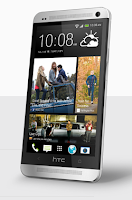
To delete one name or number
1. On your devices Call History tab, press and hold the name or number you wish
to delete.
2. And tap Delete from call history.
To delete the entire call history list
 then go to Remove call history.
2. On the Delete from call history Lcd, tap
3. Choose Select all and then tap Delete.
Tuesday, September 9, 2014
HTC One review part 1 Design

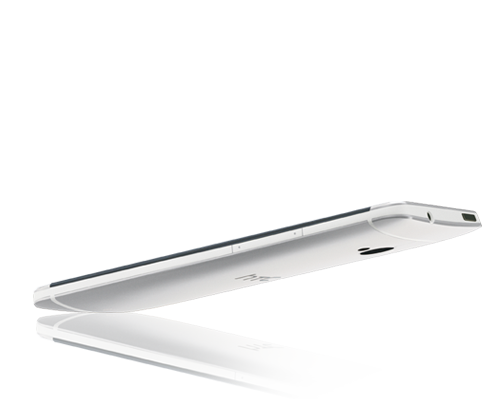
Size: 137.4 x 68.2 x 9.3mm
Weight: 143g
Display: 4.7 inch, Full HD 1080p, 468 PPI
Design
 HTC put in a lot of effort to make this device look amazing - efforts which have been a great success. However, design was never a weak point of HTC devices. As far back as I remember, HTC devices were always one step ahead of the competition when it came to the design and form innovation. So for me, it is not a surprise that HTC One sets a new standard of build quality and design.
 Gaps
However, some users are reporting a wide gap between its plastic and metal surfaces. I dont have any on mine, but as far as I know this problem is not a matter of just few devices. So right after you buy yours, make sure it doesnt have any gaps. Is it something that should stop you from buying HTC One? Surely not. It is normal in every production process that sometimes there are some manufacturing issues. On the other hand, it seems that HTC quality testing department is not working very well, if units with gaps are passing build flaw tests. HTC One is a premium device for a premium price, so as a customer, you have a right to expect a gap free product (especially since HTC advertised the device as "gap free"). If you have noticed any, go to the store where you bought your device and exchange it for a gap free unit.
Made from one piece of aluminium
 HTC One is known to be made from aluminium with a unibody construction. You can have a silver model or a black one at the moment (more colours are rumoured to be on the way). I can tell you that both look amazing. The black device looks to be more solid, but silver gives you a better, more premium look and feel. Not much to discuss when it comes to colours, because its a matter of a taste of each user. If you want to read more about the process of designing the HTC One, you can visit this blog - Metal-morphosis of the New HTC One and this one - Making the New HTC One.
No removable battery - no problem
The unibody design has some particular consequences. First of all, you cant remove or change the battery inside the HTC One. Is it an issue? Personally, I never found it to be a problem. There are methods to switch off the device completely without removing the battery - a combination of power + volume buttons. Also, I shared my thoughts on this topic here - Removable battery - do we really need it? Its been a while already since the HTC One has been on the market and its a best-selling product, despite its non-removable battery. Does this mean a removable battery is not that important in the end?
Of course I understand some arguments against having a non-removable battery. But there are always two sides of an argument and Im not here to judge which side is better. Personally I just prefer unibody design, mostly because I see no reason to replace or remove the battery inside the device.

No micro-SD card - no problem either
It seems that no micro-SD card slot is also a consequence of having such a design. However, I can imagine that a micro-SD card could be used the same way as micro-SIM card is and it wont make it impossible to have a unibody design. On the other hand I also dont find any reasonable arguments to have a micro-SD card. The vast majority of users dont need more then 32 GB of available space. If you want to know more details about Android and internal memory you can read my article here - Virtual SD card on Android. HTC One is not supposed to be your personal media storage - for that you should buy a mini-PC with an mATX motherboard and 2x2TB HDDs connected with RAID. If the internal storage on your HTC One is full, backup some pictures or music onto your PC (or use USB OTG).
What to improve
Is there room for some improvements? Yes, I think there is. First of all, the design of the hardware buttons is not really comfortable. Having the power button on the top of such big device is not the best solution. Also, the power button itself is too small and it doesnt protrude enough from the surface, so its quite hard sometimes to press it. Maybe its because of the IR sensor built into the button that they were stuck with this design. I believe that having a power button located on the right hand side of the device (like on Nexus devices) and volume buttons on the left hand side would be a much better solution.

Secondly, the build of the front speaker grilles. These tiny holes can get clogged very easily. I cant think of an alternate solution at the moment; I guess its just the downside of having a smartphone with amazing sound capabilities, known as HTC BoomSound™.
The last biggest design flaw I found are capacitive buttons. There are just 2 buttons - home and back button. It is already confirmed that under the HTC logo there is a touch sensor as well, and with the new "logo2menu" feature available in most custom kernels for HTC One it is possible to assign the HTC logo as a menu button. I think that the trend to have fewer buttons on smartphones comes from Apple - but iOS is a completely different operating system with a much simpler UI, and its quite impossible to make the Android user experience that simple. Having just 2 capacitive buttons brings some negative consequences, for instance there is significant confusion about different "long-press" and "double-tap" combinations. For example, to activate the menu function you need to long press the Home button. To display "Recent Applications" you need to quickly tap twice on the Home button. Wouldnt it be easier for the end users to have 3 buttons instead of just 2, where one of them can be used in 3 different ways?
- 1 tap = home
- 2 tap = recent apps
- long tap = menu

Im writing this review using Android 4.2.2 on my HTC One. On Android 4.1.2 it was less complicated, but somehow worse, because without the possibility to assign a long tap on the home button as "menu", you would have to deal with an ugly black "action overflow" button at the bottom of the display, the result of application developers failing to implement the appropriate Android SDK (level 11 or higher). Such a button takes about 10% of the Lcd space and in some cases it does absolutely nothing. You can disable it by proper system modification (qemu.hw.mainkeys=1) but then you wouldnt be able to access the apps settings if the particular app doesnt support Android SDK level 11+. You can read more about Googles approach to the issue here - Say Goodbye to the Menu Button.
I believe that the perfect combination of capacitive buttons would be following:
 - Back button
---> short press = back
---> long press = kill recent app
- Home button
- Menu button
---> short press = home
---> long press = recent apps
- 1 tap = home
- 2 tap = recent apps
- long tap = menu

Im writing this review using Android 4.2.2 on my HTC One. On Android 4.1.2 it was less complicated, but somehow worse, because without the possibility to assign a long tap on the home button as "menu", you would have to deal with an ugly black "action overflow" button at the bottom of the display, the result of application developers failing to implement the appropriate Android SDK (level 11 or higher). Such a button takes about 10% of the Lcd space and in some cases it does absolutely nothing. You can disable it by proper system modification (qemu.hw.mainkeys=1) but then you wouldnt be able to access the apps settings if the particular app doesnt support Android SDK level 11+. You can read more about Googles approach to the issue here - Say Goodbye to the Menu Button.
I believe that the perfect combination of capacitive buttons would be following:
 - Back button
---> short press = back
---> long press = kill recent app
- Home button
- Menu button
---> short press = home
---> long press = recent apps
Shiny edges
 Coming back to overall design, I forgot to mention that I really like the shining aluminium edges of the One. Its much more visible on the silver version, which is also known to be less susceptible to fingerprints. This is a really awesome effect, and there is no phone on the market that looks as good as the HTC One. Say no to plastic!
Heat dissipation
Apart from premium looks, the aluminium unibody brings one more very important feature. It works as a natural, huge radiator, taking out heat from inside your device. I can definitely tell that the HTC One is running much cooler than the HTC One X or One X+. The included "System on a Chip" is part of the reason, but the aluminium body helps a lot in dissipating any heat that does build up.

Camera
Camera housing is flat in HTC One, and its very good move from HTC. In HTC One X/X+ camera housing protrudes from the phone body and it was very easy to scratch it. It seems that HTC took seriously users feedback in that matter.
Verdict
There is a lot of marketing effort behind the HTC One, but this time its one of those rare occasions where advertising doesnt lie. The HTC One is a premium product, with unique and completely amazing design. If youre looking for a smartphone that will gain people attention on the street, the HTC One fits perfectly. But design is not all - it also has great hardware inside, but this is a material for part 2 of this review, coming in a few days!
PS. I want thank to Tom Kelsall, my HTC Elevate companion for his help in a proper grammar redaction of the review! Thanks Tom!

Design summarize:
+ overall design
+ aluminium unibody construction
+ it feels really great in the hand
+ available in two great looking colours
+ two sound grids for best multimedia experience
+ aluminium unibody construction
+ it feels really great in the hand
+ available in two great looking colours
+ two sound grids for best multimedia experience
- gaps on some units
- only 2 capacitive buttons
- hardware buttons location
Sunday, September 7, 2014
HTC One Google Edition Android 4 2 2 Stock Rom
HTC One is now one of the most popular high end device of 2013.Its superb features and Hardware specs can compete with any smartphone available in the market now.HTC One is a strong competitor of Samsung Galaxy S4 & Sony Xperia Z.HTC One comes with Android 4.1.2 and now upgradable to 4.2.2.But other good news from HTC is that Google Edition of HTC One is now available.
What is Google Edition of Android???
What is Google Edition of Android???
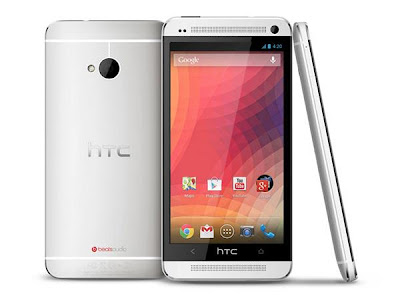
Well many from you know about Googles Nexus series of smartphones & tablets.This devices come with Pure Android OS.They devices gives you pure android experience.No external skins or launchers are come in it.For example Samsung has their Touchwiz or HTC has their HTC Sense.
So know you can get that pure experience of Android OS in your HTC One (m7) or Samsung Galaxy S4...
In this post we will guide you about how to Install Google Edition of Android in your HTC One
1. Before You Begin:
- Make sure your device battery is charged upto 60%.
- Enable USB debugging mode (Menu (app drawer) > Settings > Manage Applications > Development > USB Debugging – check box).
- Install HTC One drivers from
- Download HTC USB Drivers or Download HTC Sync Manager (Contains Drivers).
- Your phone bootloader must be unlocked.
- You phone must be rooted & with custom recovery (You can do it from here).
3. Install Google Edition Stock Rom in HTC One:
- Connect your device with PC & copy downloaded file into Internal storage of your device.
- Power Off your device.
- Now boot in Recovery Mode by pressing VOLUME DOWN+POWER BUTTON and then select "Recovery".(Use Volume keys to move up/down & Power key for select)
- Now select Install zip from SDcard and select the downloaded file (you copy in first step).
- Select YES for start installing of Google Edition.
- The installation process take few minutes to complete.
- Now select Reboot System from the main menu of recovery.
- First boot of device can take upto 10 mins.
- Now your device & you is ready for enjoying the Pure Nexus Experience.
Now enjoy the Google Edition of Android in you HTC One device.....
Saturday, September 6, 2014
Incoming Android 4 4 3 with HTC Sense 6 1 for the HTC One M8

HTC has been working hard to keep the HTC One M8 at the cutting edge. These days, one of the crucial strategy element in the war between smartphones companies is to keep their top devices bundled with the latest Android OS.
Android 4.4.3 was released a short while ago but HTC has already merged the newest 4.4.3 source code with their Sense UI framework. The incoming update will probably bring improved HTC Sense version, however the current practice shows that HTC doesnt like to bump their Sense version to anything but .5 a or full number (Sense 5 ---> Sense 5.5 ---> Sense 6) so the official Sense version might remain 6.0 even if some parts of the code will mention HTC Sense 6.1. Also, the new official HTC BlinkFeed (com.htc.launcher) version 6.1.779245 is already available on the Google Play. So what are some the incoming changes?
- ro.build.id=KTU84L
- ro.build.version.release=4.4.3
- ro.com.google.gmsversion=4.4.3_r1
- HTC SDK API: 6.25 (current latest M8 software is based on SDK 6.17) ---> this might indicate improved HTC Sense version
- Improved camera drivers
- Gamepad buttons code
- HTC Files manager
- Improved audio drivers
- Android fstab for enabling zRAM on 2GB device
- Improved thermal configuration
There are also some changes in the code that indicates the possibility to answer the phone with the power button or support for "notification_flash_led_8color" which means that HTC One M8 led might blink in 8 different colours or it could be reserved for the HTC Desire series only.
Friday, September 5, 2014
HTC One Android 4 2 2 with HTC Sense 5 1 aka HTC Sense 5 0

There were quite a lot of rumours about upcoming HTC Sense and Android 4.2.2 update for HTC One and HTC Butterfly. All were expecting HTC Sense 5.1 to show up, but instead, the version of HTC UI in latest Android 4.2.2 update is still 5.0. However, it does have a lot of important changes. Let me introduce few of them.
Finally! The most popular modification in custom ROMs of all kind. Now you can enable it under Settings ---> Power ---> Show battery level.

HTC did a great job by incorporating Android native EQS. You can switch it by tapping on the EQS icon in the upper right corner of the notification menu.

3. Android Daydream
Another Android 4.2.2 feature included in latest HTC update.

4. Long press home button works as menu button.
Its been very popular modification in HTC One custom ROMs. Now its by default added to Android 4.2.2 update as well.

5. Minor changes in the app drawer and dock
Now you can remove all the icons from the dock, which wasnt possible in HTC Sense 5.0 we had in Android 4.1.2. Also, after moving some particular icon to the dock, it wont be gone from the app drawer.

6. More new screenshots coming soon!
Monday, September 1, 2014
Best Mobile Game HTC One X or Galaxy S III
Best Mobile Game, HTC One X or Galaxy S III? - Samsung Galaxy S III and HTC One X is included in the ranks of top-tier Android smartphones equipped with quad-core processor with a graphics subsystem capable.
The second screen of this phone was arguably the quality is very good with large size and high resolution.
Both of these make the Galaxy S III and One X is not only ideal for use bermultimedia such as surfing the Internet or watching HD video, but also to play games.
Both processors have the same four CPU cores based on ARM Cortex A9, but the Exynos 4412 and Tegra 3 uses a different GPU unit. Performance of the two smartphones in the running game was different though not contradictory.
Well, between the two flagship Samsung and HTC, which is more reliable to accompany your adventure in your favorite game?
In addition to the processor and the physical, the other point of difference between the Samsung Galaxy S III and HTC One X lies in the size and type of screen used.

With a massive resolution of 1280x720, the display image on the screen is very sharp both the contrast and color saturation.

For another thing, these two smartphones tend to be similar. RAM capacity of 1 GB alike, resolution 8-megapixel camera, and even the physical dimensions and weight of the two only differs marginally.
From the hardware side, the advantages of the Galaxy S III than One X is the support of 4G LTE (for certain markets) as well as storage capacity that can be expanded with a micro SD card up to 64 GB. One X only offers 32 GB of internal storage with no memory slot.
In terms of gaming, micro SD card will certainly help users move large files such as photos or videos to the remaining space in the internal storage that can be filled with gaming applications.
Moreover, game titles modern Android could reach hundreds of megabytes of storage capacity that can be spent quickly.
Overview Technical Specifications

benchmark
To measure the level of game theoretical performance of each smartphone, used two benchmark tests focusing on the graphics, the GLBenchmark 2.5 and RD 3D Benchmark. Here is a brief test results both.
GLBenchmark 2.5
From the hardware side, the advantages of the Galaxy S III than One X is the support of 4G LTE (for certain markets) as well as storage capacity that can be expanded with a micro SD card up to 64 GB. One X only offers 32 GB of internal storage with no memory slot.
In terms of gaming, micro SD card will certainly help users move large files such as photos or videos to the remaining space in the internal storage that can be filled with gaming applications.
Moreover, game titles modern Android could reach hundreds of megabytes of storage capacity that can be spent quickly.
Overview Technical Specifications
benchmark
To measure the level of game theoretical performance of each smartphone, used two benchmark tests focusing on the graphics, the GLBenchmark 2.5 and RD 3D Benchmark. Here is a brief test results both.
GLBenchmark 2.5


RD 3D Benchmark


GPU Mali-400MP GPU on the processor Samsungs Exynos 4412, according to the benchmark, though the graphics have performance that is higher than ULP Geforce 4 +1 cores in the Tegra 3.
So, does this mean that the Samsung Galaxy S III is a smartphone that is superior in the running game? Not really.
Problem Support Title Game
Although slightly behind Exynos 4412 in terms of gaming performance theory, in fact, in most games, the performance of Tegra 3 in HTC One X is very adequate.
The advantages of the Tegra 3 is a developer support applications (game) to the processor on this one. Support or optimization, among other things, allow Tegra 3 display graphical effects are more affluent than other processors.
Like what? Examples can be seen in the game Dead Trigger screenshot below.

Dead Trigger, setting grafis "Ultra High"

Dead Trigger, setting grafis "High"
In the picture above, it appears that the graphics settings "Ultra High" adds a realistic effect of water puddles, complete with sparks that arise when the bullet shot into it. There are also other graphical features such as lighting and smoke better visualization. Visual effects will not be noticeable when the game is run with the graphics settings "High".
Well, setting "Ultra High" in Dead Trigger can only be run on a smartphone with Tegra SoC because this game is designed for NVIDIA processors are homemade. On the Galaxy S III, Dead Trigger refusing to go on a setting higher than "High".
Other game titles too (which is optimized for Tegra) has many similar capabilities, such as Horn, Beach Buggy Blitz, Shadowgun, Riptide GP, Nova 3, and Bladeslinger THD promises console quality gaming graphics class, when run on device Tegra 3.
Graphical display of the Tegra 3 is certainly pretty worthless. The better the game image shown, the more burden borne by the processor and the graphics processor smartphone.
As a result, games can run in broken though not all quite "heavy" to make HTC One X to its knees.
One of the games that could deliver high graphics processing load with prime quality graphic display is First-Person Shooter Nova 3.
Galaxy S III himselfm not able to display graphical effects ciamik. In some cases, such as the Dead Trigger on top, the game can be tricked with file modification that would result in additional visual effects, although not being run by a device with a Tegra processor.
However, it still uses the Tegra 3 is a more practical way to get a better view of the game titles that are optimized for these processors.
Nvidia also provides specialized portal, which Tegrazone, as a means of Tegra device owners to obtain game titles that are optimized for the device.
Conclusion
In terms of gaming, there is no absolute winner between the Samsung Galaxy S III and HTC One X. Each has its own advantages points when used for this one.
The second major difference in terms of mobile gaming may be located on the higher performance offered by the Galaxy S III and beautiful graphics that can be presented HTC One X (in a game optimized for Tegra).
Speed or quality of the display, which is more important? It depends on user preferences and the needs of the game being played. The answer is determined by how much like a smartphone user to see better graphics in the game and to what extent tolerance to the smooth frame rate when playing.
Two phones even this is not the only Android device that can be used to play games. Class models under them were able to run the game in accordance limit the hardware capabilities of each.
However, as you are the products from each manufacturer, presented the experience of playing the Galaxy S III and X One could arguably among the most good for the Android smartphone platform today.
Well, setting "Ultra High" in Dead Trigger can only be run on a smartphone with Tegra SoC because this game is designed for NVIDIA processors are homemade. On the Galaxy S III, Dead Trigger refusing to go on a setting higher than "High".
Other game titles too (which is optimized for Tegra) has many similar capabilities, such as Horn, Beach Buggy Blitz, Shadowgun, Riptide GP, Nova 3, and Bladeslinger THD promises console quality gaming graphics class, when run on device Tegra 3.
Graphical display of the Tegra 3 is certainly pretty worthless. The better the game image shown, the more burden borne by the processor and the graphics processor smartphone.
As a result, games can run in broken though not all quite "heavy" to make HTC One X to its knees.
One of the games that could deliver high graphics processing load with prime quality graphic display is First-Person Shooter Nova 3.
Galaxy S III himselfm not able to display graphical effects ciamik. In some cases, such as the Dead Trigger on top, the game can be tricked with file modification that would result in additional visual effects, although not being run by a device with a Tegra processor.
However, it still uses the Tegra 3 is a more practical way to get a better view of the game titles that are optimized for these processors.
Nvidia also provides specialized portal, which Tegrazone, as a means of Tegra device owners to obtain game titles that are optimized for the device.
Conclusion
In terms of gaming, there is no absolute winner between the Samsung Galaxy S III and HTC One X. Each has its own advantages points when used for this one.
The second major difference in terms of mobile gaming may be located on the higher performance offered by the Galaxy S III and beautiful graphics that can be presented HTC One X (in a game optimized for Tegra).
Speed or quality of the display, which is more important? It depends on user preferences and the needs of the game being played. The answer is determined by how much like a smartphone user to see better graphics in the game and to what extent tolerance to the smooth frame rate when playing.
Two phones even this is not the only Android device that can be used to play games. Class models under them were able to run the game in accordance limit the hardware capabilities of each.
However, as you are the products from each manufacturer, presented the experience of playing the Galaxy S III and X One could arguably among the most good for the Android smartphone platform today.
Sunday, August 31, 2014
HTC One V Mobile Ice Cream Sandwich Reviews Specifications
HTC One V, Mobile Ice Cream Sandwich Reviews - Three of the family One Android smartphone, is now a pride of HTC smartphones. One is HTCs flagship smartphone X, targeting upscale segments. While HTC One V, designed to target the middle class segment.
HTC One V has entered the Indonesian market since last April, sold at relatively affordable, yet rich in useful features.
Design & connectivity
HTC One V has a unique shape on the bottom, designed curved like a human chin. His body was wrapped in aluminum material and there is a rubber material in the lower back, as cover SIM card slot and MicroSD card. Rubber material is also used on the back of the place where the camera is.
This smartphone has a dimension of 120.3 x 59.7 x 9.2 mm and weighs 115g, quite comfortable when in the grip. You can grab the whole screen with just one hand.
One V has a 3.7-inch wide-screen landscape covered with scratch-resistant glass Gorilla Glass. Below the display, there are three capacitive buttons back, home, and recent apps. There is a sensation of vibration effects when buttons are touched.
The back of it there is a 5MP camera and LED flash. On the up side, there is a power button and a 3.5 mm audio jack. On the left side there is a MicroUSB port, while the right side is the volume button.

V One very bright screen, colorful icons and features of the smartphone application is shown with contrast and sharp. Super LCD2 screen technology, a resolution of 480 x 800 pixels, and a pixel density of 252 pixels per inch.
When in the sun, V One screen can still be viewed comfortably.
Kitchen runway One V reinforced with single-core processor Qualcomm MSM8255 Snapdragon 1 GHz, 512 RAM and Adreno 205 graphics processing unit. From experience KompasTekno, kitchen runway gives the sensation of navigating a fairly smooth, but can not be called satisfactory.
One V have been using the Android operating system 4.0 (Ice Cream Sandwich). This smartphone is able to play the game light and middle class. But when asked to play the games the heavyweights, he feels overwhelmed.
One V available internal memory of 4GB. Users can expand the storage via MicroSD external memory card up to 32GB. HTC also gives bonus data storage media in the cloud (cloud) from Dropbox 25GB free for 2 years.
Audio quality HTC One V powered by software BeatsAudio, which is claimed to give the sensation of sound more detail and bass elements kick. When the smartphone is placed in the position of the screen facing up, the music comes out sounding more balanced.
Camera
The main camera is a 5MP sensor One V equipped and supported by an LED flash. This camera uses a 28mm lens and aperture 2.0. Unfortunately, HTC does not provide a front camera in One V, so that the smartphone can not be used for video call.
In the camera settings menu, there is a scene camera features, flash, zoom, self-timer, image resolution, video quality, review duration, image adjustments, ISO, white balance, storage, continuous shooting, camera options, video options, camera interface, auto upload, and reset to default.
There is also a function of High Definition Resolution (HDR), macro and panorama. HTC also provides a variety of effects and filters to enhance your innate photos. If the camera is used to record video at maximum resolution is 720p.
Default application useful
Polaris Office
HTC came with some default application that is useful for users One V. The first Polaris Office is office applications, which could be used to create, open, edit and format documents Word, Excel, and PowerPoint.
Car
HTC provides digital map application and navigation Car in One V. To be able to run this application, you must include an external memory card.
TuneIn Radio
Although available features FM radio, but HTC adds internet radio app TuneIn Radio. In addition to listening to local radio, users can enjoy the V One radio broadcasts in other areas such as Bandung, Yogyakarta, and so on, uses the internet.
Flashlight
Flashlight alter the function of One V be a tool torch (flashlight), light out of an LED flash next to the main camera.
Dropbox
Media data storage in the cloud (cloud), currently is a trend in the world of computing. HTC does not want to miss that provide cloud services for users One V. 25GB data storage capacity is provided free of charge for 2 years from Dropbox.
Battery life
One V supported by HTC 1500mAh battery capacity, which is installed permanently (can not open pairs). When the battery is 100%, KompasTekno test durability by enabling service GMail, Facebook and Twitter, all of which are used intensively. As a result, the battery capacity of 1500mAh can last for approximately 10 hours.
Please note, the battery life is very dependent on the signal carrier do you use, and how often you access the internet and social networking sites. The battery is also more rapidly depleted if you enable GPS, and Bluetooth.
Conclusion
Excess
There is also a function of High Definition Resolution (HDR), macro and panorama. HTC also provides a variety of effects and filters to enhance your innate photos. If the camera is used to record video at maximum resolution is 720p.
Default application useful
Polaris Office
HTC came with some default application that is useful for users One V. The first Polaris Office is office applications, which could be used to create, open, edit and format documents Word, Excel, and PowerPoint.
Car
HTC provides digital map application and navigation Car in One V. To be able to run this application, you must include an external memory card.
TuneIn Radio
Although available features FM radio, but HTC adds internet radio app TuneIn Radio. In addition to listening to local radio, users can enjoy the V One radio broadcasts in other areas such as Bandung, Yogyakarta, and so on, uses the internet.
Flashlight
Flashlight alter the function of One V be a tool torch (flashlight), light out of an LED flash next to the main camera.
Dropbox
Media data storage in the cloud (cloud), currently is a trend in the world of computing. HTC does not want to miss that provide cloud services for users One V. 25GB data storage capacity is provided free of charge for 2 years from Dropbox.
Battery life
One V supported by HTC 1500mAh battery capacity, which is installed permanently (can not open pairs). When the battery is 100%, KompasTekno test durability by enabling service GMail, Facebook and Twitter, all of which are used intensively. As a result, the battery capacity of 1500mAh can last for approximately 10 hours.
Please note, the battery life is very dependent on the signal carrier do you use, and how often you access the internet and social networking sites. The battery is also more rapidly depleted if you enable GPS, and Bluetooth.
Conclusion
Excess
- + Many useful applications built
- + Affordable
- + Screen brilliant
Shortage
- - The main camera is less satisfactory
- - No front camera
Specifications HTC One V
- - Single-core processor Qualcomm MSM8255 Snapdragon 1GHz
- - Unit 205 graphics processor Andreno
- - 512MB RAM
- - Operating system Android 4.0 (Ice Cream Sandwich)
- - 4GB internal memory
- - The screen is a 3.7-inch 480 x 800 pixel resolution, pixel density of 252 pixels per inch, and display technology Super LCD2
- - 5MP camera with LED flash, no front camera
- - Battery 1500mAh
- - Connectivity GSM SIM card, 3.5 mm audio jack, MicroUSB, MicroSD, 3G, HSPA, GPS, Wi-Fi, Bluetooth
- - Dimensions 120.3 x 59.7 x 9.2 mm
- - Weight 115 grams
- - Price, you can look on google
Subscribe to:
Posts (Atom)
