Showing posts with label desire. Show all posts
Showing posts with label desire. Show all posts
Monday, November 17, 2014
HTC announces Desire 310

The High Tech Computer Corporation announced a new Android based smartphone named Desire 310. We have got its details and the specifications of the device.
The Desire 310 will come out of the box with a Quad-Core chipset clocked at 1.3GHz processor, 4.5-inches FWVGA screen with the resolution of 480 x 856 display, four gigabytes of internal memory (expandable via microSD card slot), a gigabyte of Random Access Memory, 5 megapixels primary camera and 0.3 megapixels front-facing camera, 2,000mAh powered battery and runs Android version 4.2 Jelly Bean.

It comes in blue, white and orange color options. This device comes in Dual-SIM version too. It will available in the beginning of the April and no word on the pricing yet.
Source: Pocketnow

Monday, October 13, 2014
How to Send a Multimedia Message and Create a Slideshow on HTC Desire 816
 Text messaging has grown its popularity over the years especially to younger generations. People, especially teens, prefer to communicate with friends and relatives thru texting instead of the traditional call. But whether your reaching out to friends thru text or a call, what matters most is the effort for still trying to keep in touch despite distance and even on busy schedules. We should be more grateful these days as it only takes minutes, even seconds, for a quick response unlike the old school snail mail. Now, everyone is just a text away. And more to that, you can even send multimedia messages (MMS) especially on special occasions to add more touch to a simple text-filled Lcd.
Heres how you can send a MMS on HTC Desire 816:
1. On your devices homeLcd, tap on
 and go to Messages.
2. Then tap on

3. On the To Field, key in a contact name, mobile number or email address. You can also send it to a group of friends by tapping on

4. To add a subject line, tap on
 and go to Add Subject.
5. Tap on the box that says Add text and there you can type in your special message.
6. Choose an attachment for your message by tapping on

7. After you browse and select an attachment, tap on Send or press
 to save it as a draft. You can also tap on
 to see options like replacing, viewing and removing your attachment.
Now if you wish your Mutimedia Message to reach an extra mile, you can have it on a slideshow format. Heres how you can create one:
once again and select Slide.2. Then choose where you want to insert the next slide.
3. When youre done adding the next slide, you can either do the following:
- tap onand choose to add a video or a photo
- tap onand then audio if you want to add a voice recording or a music to the slide
- tap on Add Text to add a caption
- tap onto view options like replacing, viewing or removing your attachment.
select Preview. If you dont see Preview, scroll down the menu. To view the playback controls, tap once the preview Lcd.5. When its all set and done, press on or tap on Send to save message as a draft.
or tap on Send to save message as a draft.Now you can make someones day a very special one with this creative and personalize MMS.
Thursday, September 25, 2014
How to Set HTC Desire U into Sleep Mode
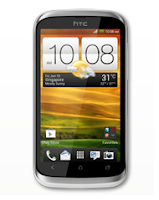
Like any other device, setting HTC Desire U into sleep mode will somehow save its battery life. Sleep mode puts your device into a lower power state while the display is off. It also prevents accidental button presses when its in your pocket or bag. Heres how you can set HTC Desire U into sleep mode.
1. Briefly press on your devices Power button to turn off the display. Then switch to Sleep Mode.
2. To change the time before your device sleeps, just go to Display & buttons settings.
3. To wake it up, manually press the Power button and unlock your Lcd.
4. Your device will also automatically wakes up when you have an incoming call.
Friday, September 5, 2014
Comparison LG Optimus L9 vs HTC Desire X
Comparison: LG Optimus L9 vs HTC Desire X - HTC Desire X and LG Optimus L9 both powered with a dual core processor. HTC Desire X Snapdragon MSM8225 Qualcomm chipset with support for dual-core 1GHz processor, Adreno 203 GPU, and 786MB of RAM. While the LG Optimus L9 use TI OMAP 4430 chipset with support for dual-core Cortex A9 processor 1GHz, PowerVR SGX540 GPU and 1GB of RAM. It is clear that the LG Optimus L9 offers better performance.
Both devices have an internal memory capacity of 4GB plus microSD slot support up to 32GB. LG Optimus L9 and HTC Desire X are both present uses the Android operating system 4.0.4 Ice Cream Sandwich.
LG Optimus L9 has a size larger touch screen. LG Optimus L9 using IPS screen measuring 4.7 inches with a resolution of 540 x 960 pixels (234ppi). While HTC Desire X uses the Super AMOLED screen measuring 4 inches with a resolution of 480 x 800 pixels (233ppi).
HTC Desire X and LG Optimus L9 both equipped with a 5 megapixel rear camera. But the camera LG Optimus L9 more special because it has the ability to record video FullHD 1080. LG Optimus L9 is also equipped with a VGA front camera, while the HTC Desire X is not equipped with a front camera.
For connectivity features, both equipped with features dukunngan 3G HSDPA and HSUPA, Wi-Fi b / g / n, Bluetooth, GPS, and microUSB port.
And for power, HTC Desire X comes with 1650mAh capacity battery, while the LG Optimus L9 comes with a battery capacity of 2150mAh.
HTC Desire X
HTC Desire X is equipped with features like a 5 megapixel camera, 4GB of internal memory plus a microSD slot, Bluetooth, Wi-Fi, GPS, and a 1650mAh capacity battery.
LG Optimus L9
LG Optimus L9 smartphone that has a size of 131.9 x 68.2 x 9.1mm and weighs 125 grams is equipped with an application that is able to translate Qtranslator more than 44 different languages using Optical Character Recognition technology.
Subscribe to:
Posts (Atom)
